Wireless smart locks make it easier to secure your home without carrying traditional keys. The best models combine reliable deadbolt hardware with convenient access options such as fingerprints, PIN codes, smartphone apps, and remote control.
This roundup compares 10 strong options for different priorities, including built-in Wi-Fi, video doorbell features, Matter compatibility, hands-free entry, and budget-friendly keyless access.
Best 10 Wireless Smart Locks Picks for 2026
Best Matter-Ready Pick
ULTRALOQ Bolt SE WiFi Smart Deadbolt

- Seven entry methods, including fingerprint and passcode
- Built-in Wi-Fi with remote access and sharing
- Matter over Thread support with long claimed battery life
Best For: Flexible households and Matter-enabled smart homes
Best Fingerprint Value

- Six unlocking methods, led by fast fingerprint entry
- Built-in Wi-Fi requires no bridge
- Works with the eufy ecosystem and offers eight-month battery life
Best For: eufy users and households favoring biometric access
Best Established Wi-Fi Option
Schlage Encode Smart WiFi Deadbolt

- Built-in Wi-Fi for remote app management
- Stores up to 100 access codes
- Includes customizable alarm and auto-lock features
Best For: Households needing many codes and keypad-based access
Best Handle-Style Rental Lock
Sifely S Fingerprint Smart Lock

- Five local entry methods, including fingerprint and RFID
- Flexible guest codes with Bluetooth app management
- Optional gateway adds remote and supported voice control
Best For: Rentals and homes needing a lever-handle replacement
Best Biometric Pick

- Fast fingerprint unlocking with an AI-learning scanner
- Built-in Wi-Fi app control and four entry methods
- Up to eight months of battery life with USB-C backup
Best For: Households wanting fast fingerprint entry and flexible backup access
Best No-Hub Value

- Built-in Wi-Fi works without a hub or bridge
- Keypad, app, voice, and physical-key entry
- No monthly fee with customizable auto-lock
Best For: Homeowners seeking simple remote access without hub costs
Best Integrated Entry System

- Combines a deadbolt, video doorbell, and 2K HDR camera
- Face, fingerprint, PIN, app, and key entry options
- Color night vision, two-way audio, and remote alerts
Best For: Homes wanting integrated video security and keyless entry
Best Hub-Free Versatility

- Built-in 2.4GHz Wi-Fi with no hub required
- Fingerprint, passcode, app, key, and voice entry
- Supports up to 100 custom passcodes
Best For: Families and homeowners wanting many access options
Best for Managed Access
Veise VE017 Fingerprint Smart Lock

- Remote user and permission management
- Supports multiple code types and fingerprints
- Local AES-128 data storage and activity logs
Best For: Rental properties and multi-user access control
Best for Outdoor Durability
TEEHO TE012W Wi-Fi Fingerprint Lock
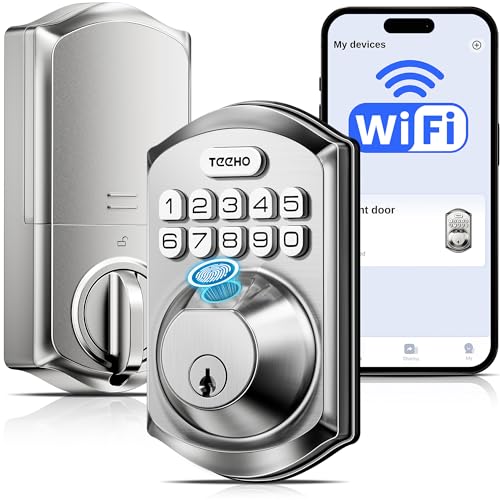
- IP55 weather resistance and BHMA Grade 3 certification
- Five entry methods with built-in Wi-Fi
- Eight AA batteries and low-battery alerts
Best For: Exterior doors and rental properties
Best Matter-Ready Pick – ULTRALOQ Bolt SE WiFi Smart Deadbolt
The ULTRALOQ Bolt SE is a versatile choice among wireless smart locks, combining built-in 2.4 GHz Wi-Fi, fingerprint entry, passcodes, app control, voice assistants, and Matter support. It is especially useful when you want several access methods without adding a hub for standard Wi-Fi control.
Best For: Households, rentals, and smart-home users who want flexible entry methods and Matter integration.
Pros:
- Offers fingerprint, passcode, app, web portal, eKey, voice, and physical-key entry.
- Built-in Wi-Fi supports remote management, access sharing, notifications, and activity history without a hub.
- Matter over Thread support and a claimed battery life of up to 18 months expand smart-home flexibility.
- ANSI BHMA certification, IP65 protection, and DIY installation support everyday exterior-door use.
Cons:
- Matter remote access requires a compatible Matter over Thread hub.
- Standard Wi-Fi control is limited to 2.4 GHz, and the router should be within about 70 feet.
- A door sensor is not included.
Choose this model if broad access control and ecosystem compatibility matter more than keeping the setup extremely basic. Its built-in Wi-Fi handles everyday remote access, while Matter and Thread provide an additional smart-home path.
Best Fingerprint Value – eufy Security Smart Lock C220
The eufy Security Smart Lock C220 is a practical wireless smart lock for shoppers who prioritize fast fingerprint access and straightforward remote control. Its built-in Wi-Fi avoids the need for a bridge, while the eufy app connects the lock with other compatible eufy devices.
Best For: Front-door users who want fingerprint unlocking, app access, and eufy ecosystem integration.
Pros:
- Provides six unlocking methods, including fingerprint, app, keypad, physical key, Apple Watch, and voice control.
- Built-in Wi-Fi enables remote control without a separate bridge.
- Self-learning fingerprint recognition is designed to become more precise with use.
- BHMA Grade 3 certification, IP53 protection, and a claimed eight-month battery life support everyday use.
Cons:
- Battery life varies with lock usage and is shorter than some long-life smart-lock claims.
- Voice control is listed for Alexa and Google Assistant, not Siri.
- IP53 protection is less substantial than the IP65 rating offered by some competing models.
The C220 is a strong fit when quick biometric entry and simple remote app control are the priorities. It also makes particular sense for households already using eufy doorbells or other eufy products.
Best Established Wi-Fi Option – Schlage Encode Smart WiFi Deadbolt
The Schlage Encode is a dependable-looking choice among wireless smart locks for shoppers who want built-in Wi-Fi, app-based access management, and a familiar keypad design. It supports up to 100 access codes and adds customizable notifications, lock history, and a built-in alarm.
Best For: Homeowners who want a keypad deadbolt with broad code management and established security features.
Pros:
- Built-in Wi-Fi enables remote locking, unlocking, monitoring, and access-code management.
- Supports up to 100 access codes, customizable notifications, and lock history.
- Includes a customizable alarm for door movement and forced-entry attempts.
- Installs with a screwdriver, includes auto-lock options, and works with Alexa and Google Home.
Cons:
- Typical battery life is listed at up to six months, shorter than some competing models.
- Voice control requires the Schlage Home app and a voice-enabled device.
- Entry options focus on touchscreen codes and a physical backup key rather than fingerprint access.
The Encode is a sensible pick for users who value a mature keypad experience and detailed access management. Its high code capacity and alarm features make it particularly useful for busy households or controlled guest access.
Best Handle-Style Rental Lock – Sifely S Fingerprint Smart Lock
The Sifely S is a handle-style wireless smart lock that combines fingerprint recognition, PIN codes, Bluetooth app control, RFID cards, and a mechanical key. It can suit homes, bedrooms, apartments, and rentals, but remote internet access requires the separately sold Sifely Wi-Fi Gateway.
Best For: Rental owners and households seeking multiple local entry methods in a reversible lever-handle design.
Pros:
- Offers five entry methods: fingerprint, keypad, Bluetooth app, RFID key fob, and mechanical key.
- Supports permanent, timed, one-time, and recurring codes for guests or service providers.
- Includes auto-lock, passage, privacy modes, access history, and anti-peeping PIN entry.
- IP65-rated construction, reversible handle, emergency USB power, and DIY compatibility add flexibility.
Cons:
- The standard model has Bluetooth-only control; remote access requires a separate Wi-Fi Gateway.
- Four AA batteries are required but not included.
- Door dimensions, bore size, and backset must match the listed compatibility requirements.
This model is best viewed as a flexible local-access lock rather than a complete out-of-the-box remote system. Confirm your door measurements and budget for the optional gateway if internet control or supported voice features are important.
Best Biometric Pick – WYZE Auto-Lock Bolt v2
For shoppers comparing wireless smart locks, the WYZE Auto-Lock Bolt v2 stands out for fast fingerprint entry, built-in Wi-Fi, and multiple backup access methods. Its AI-learning scanner is designed to improve recognition over time, while the Wyze app supports remote lock management.
Best For: Households that prioritize fingerprint access, app control, and flexible entry options.
Pros:
- Fingerprint scanner can unlock the door in about 0.5 seconds.
- Built-in Wi-Fi enables remote control through the Wyze app without a separately noted hub.
- Offers fingerprint, app, keypad, and physical-key entry.
- Includes eight AA batteries rated for up to eight months, plus USB-C emergency power.
Cons:
- The listed IP53 rating provides weather resistance but may not suit every exposed installation.
- Its fingerprint-focused feature set may be more than needed for shoppers who only want keypad access.
The WYZE Auto-Lock Bolt v2 is a versatile wireless smart lock for users who want quick biometric entry without giving up codes, app access, or physical keys. The battery backup options add useful reassurance for daily home use.
Best No-Hub Value – eufy Security Smart Lock C30
The eufy Security Smart Lock C30 is a practical wireless smart lock for standard deadbolts, combining built-in Wi-Fi, keypad entry, remote app control, and auto-lock without a bridge or monthly fee. Its DIY installation is designed to take about 15 minutes without drilling.
Best For: Homeowners who want straightforward remote access and keypad convenience without hub costs.
Pros:
- Built-in Wi-Fi provides remote control without a separate hub or bridge.
- Fits most standard deadbolts and is designed for no-drill installation.
- Supports keypad, app, voice assistant, and physical-key entry.
- Includes customizable auto-lock, BHMA Grade 3 certification, and an IP53 exterior rating.
Cons:
- The four AA batteries are rated for up to five months, shorter than some competing options.
- It uses keypad access rather than fingerprint or facial recognition.
Choose the C30 if you value an uncomplicated installation and built-in connectivity. The lack of a monthly fee and its physical-button keypad make it a sensible everyday option for residential entry.
Best Integrated Entry System – myQ Secure View 3-in-1
The myQ Secure View 3-in-1 combines a smart deadbolt, video doorbell, and 2K HDR camera in one device. Among wireless smart locks, it is the most feature-rich choice here, offering face access, fingerprint entry, PINs, app control, visitor alerts, color night vision, and two-way audio.
Best For: Homes that want one device for keyless entry, front-door video, and visitor communication.
Pros:
- Combines a smart lock, video doorbell, and 2K HDR camera.
- Provides five entry methods: face access, fingerprint, PIN, app, and key.
- Supports remote monitoring, motion or doorbell alerts, color night vision, and two-way audio.
- Rechargeable battery is rated for four to six months and can be swapped with a spare battery.
Cons:
- Subscription is required for smart detection and myQ Smart Secure features.
- The spare battery and myQ Chime are sold separately.
- Its integrated design and 4.9-pound weight may be less suitable for shoppers seeking a simple deadbolt replacement.
The myQ Secure View is best viewed as a complete front-door system rather than a basic lock. It makes the most sense when video verification, visitor communication, and advanced entry options justify the subscription-related features.
Best Hub-Free Versatility – Philips Wi-Fi Smart Deadbolt
The Philips Wi-Fi Smart Deadbolt is a flexible choice among wireless smart locks, combining built-in 2.4GHz Wi-Fi with app, passcode, fingerprint, key, and voice-control entry. It suits households that want remote access without adding a separate hub.
Best For: Families, frequent guests, and homeowners who want several entry methods plus remote control.
Pros:
- Supports app, passcode, fingerprint, physical key, Alexa, and Google Assistant access.
- Built-in Wi-Fi enables remote locking and unlocking without an extra hub.
- Allows up to 100 custom passcodes, including one-time and scheduled codes.
- Offers activity history, real-time alerts, Away Mode, and adjustable auto-lock timing.
Cons:
- Supports 2.4GHz Wi-Fi only, with the router and lock recommended within 65 feet.
- Batteries are not included and AA alkaline batteries are required.
- Does not include a door sensor.
This lock stands out for access flexibility and hub-free remote management. Check your Wi-Fi setup and door compatibility before installation, especially if you need door-open sensing.
Best for Managed Access – Veise VE017 Fingerprint Smart Lock
The Veise VE017 is one of the more management-focused wireless smart locks, pairing fingerprint entry with app-based user permissions and activity logs. Its access controls are particularly useful for properties with multiple residents, guests, or tenants.
Best For: Multi-tenant properties, rental homes, and households that need detailed access management.
Pros:
- Provides fingerprint, app, fob card, code, shared code, mechanical key, and optional voice-control access.
- Supports permanent, recurring, duration-based, and one-time codes.
- App management allows users and permissions to be added, changed, paused, or deleted remotely.
- Stores access data locally with AES-128 encryption and provides activity logs and alerts.
Cons:
- Alexa and Google Assistant compatibility requires the G1 Gateway.
- The supplied notes do not specify the exact battery-life duration beyond a stated 12-month claim.
The VE017 is a strong fit when controlling who can enter matters as much as keyless convenience. Its gateway requirement for voice control is worth factoring into the setup, while local data storage may appeal to privacy-conscious buyers.
Best for Outdoor Durability – TEEHO TE012W Wi-Fi Fingerprint Lock
The TEEHO TE012W combines built-in 2.4GHz Wi-Fi with fingerprint, app, passcode, key, and voice access. Among wireless smart locks, it is a practical option for exterior doors because it carries BHMA Grade 3 certification and an IP55 weather-resistance rating.
Best For: Front, back, side, and rental-property doors exposed to changing outdoor conditions.
Pros:
- Offers five primary entry methods: app, fingerprint, passcode, backup keys, and voice control.
- Uses eight AA batteries, with app-based low-battery alerts.
- Includes IP55 weather resistance, BHMA Grade 3 certification, Silent Mode, and Away Mode.
- Supports anti-peeping passwords, break-in alerts, and a three-minute lockout after repeated incorrect PINs.
Cons:
- Works with 2.4GHz Wi-Fi only.
- Fingerprint access supports up to 20 users, and the keypad supports up to 100 codes.
- The screwdriver needed for installation is not included.
The TE012W offers a balanced mix of remote control, physical backup access, security alerts, and outdoor-oriented durability. Confirm your door thickness, backset, and bore-hole measurements before ordering.
How We Picked the Best Wireless Smart Locks
We evaluated these Wireless Smart Locks by comparing the features that matter most in daily use: connection type, access methods, installation needs, remote-control capabilities, security features, battery design, and compatibility with smart-home platforms. We also considered whether each model is best suited to a primary entry door, rental property, family home, or connected-home setup.
Because product specifications and app capabilities can vary by version or region, confirm current compatibility, included hardware, and any subscription requirements before buying.
Quick Comparison
| Best For | Look For |
|---|---|
| Smart-home integration | Matter or broad platform compatibility |
| Remote access | Built-in Wi-Fi or an included Wi-Fi bridge |
| Key-free convenience | Fingerprint, PIN, app, or RFID access |
| Video and entry monitoring | Integrated camera and doorbell features |
| Simple upgrades | Standard deadbolt fit and straightforward installation |
Key Buying Factors for Wireless Smart Locks
Connectivity and Remote Control
Bluetooth is useful when you are nearby, but remote locking, unlocking, alerts, and access sharing generally require Wi-Fi. Built-in Wi-Fi is convenient, while bridge-based systems may use less battery power but add another device to install.
Access Methods
Fingerprint readers provide fast entry for frequent users, while PIN keypads work well for guests, children, cleaners, and service providers. App access is valuable for remote control and activity notifications. Keep a physical key or another backup method available in case batteries or connectivity fail.
Fit, Power, and Weather Resistance
Check your door thickness, backset, deadbolt dimensions, and interior clearance before ordering. Battery life depends on usage, signal strength, and temperature, so low-battery warnings and an emergency power option are important. For exposed doors, verify the lock’s outdoor suitability rather than assuming every electronic model is weatherproof.
Security and Privacy
Look for encrypted app communication, user permissions, automatic locking controls, tamper alerts, and a reputable update process. If a lock includes a camera or cloud-connected access records, review privacy settings, data policies, and subscription terms.
Who Should Buy Which Wireless Smart Locks?
Choose a Matter-compatible model if you are building a multi-platform smart home and want more flexibility. A built-in Wi-Fi lock is a strong choice for homeowners who want remote access without purchasing a separate hub. Fingerprint-focused models suit busy households that want quick entry without memorizing codes.
For landlords, vacation-home owners, and families with frequent visitors, prioritize temporary PINs, multiple user profiles, access logs, and dependable remote management. If you want entry monitoring as well as locking, an integrated video doorbell model can reduce the number of separate devices at the front door. Before installation, confirm that the lock fits your existing deadbolt and that every regular user has a reliable backup entry method.