A good desktop soundbar can improve music, video, gaming, and calls without taking up the space required by traditional bookshelf speakers. The best models balance clear output, convenient controls, simple connectivity, and a footprint that fits beneath your monitor.
We’ve gathered 10 soundbars for desktop setups, ranging from straightforward USB-powered speakers to Bluetooth-enabled gaming models with RGB lighting. Use the guide below to narrow the options by desk space, connection type, sound priorities, and budget.
Best 10 Soundbars for Desktop Setups Picks for 2026
Balanced Desk Audio
Nylavee SK100 Computer Sound Bar

- Bluetooth 5.0 and 3.5mm AUX connectivity
- USB powered with side knob control
- Stereo drivers with bass diaphragms
Best For: Flexible wired or wireless desktop audio
RGB Gaming Focus
Razer Leviathan V2 X PC Soundbar

- Compact design fits beneath a monitor
- USB-C carries power and audio
- Chroma RGB with 14 lighting zones
Best For: Gaming desks with RGB lighting and USB-C setups
Cordless Desk Convenience
Bluedee Rechargeable Computer Sound Bar

- Up to 13 hours of cordless playback
- Bluetooth 5.3, AUX, USB, and TF playback
- Compact design fits beneath most monitors
Best For: Flexible desks and portable room-to-room listening
Lighting on a Budget
Redragon GS560 RGB Desktop Soundbar
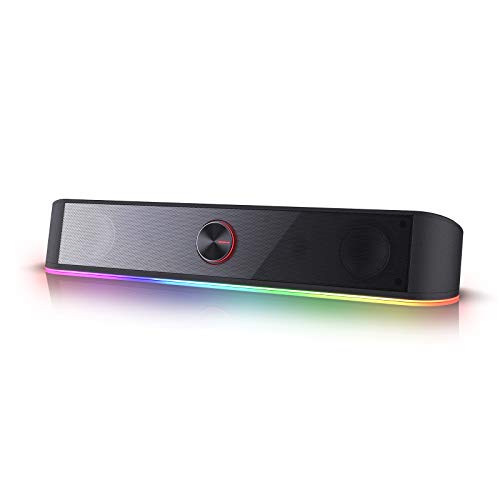
- Four RGB lighting modes
- USB powered with 3.5mm audio
- Compact bar with physical volume knob
Best For: Gaming and work desks that prioritize RGB effects
Best Compact Bluetooth Pick

- Bluetooth 5.0 and 3.5mm connectivity
- USB-powered, driver-free setup
- Slim profile with ambient lighting
Best For: Compact desks needing flexible wired and wireless audio
Best Clamp-On Option

- Spring clamp or freestanding placement
- Front knob for precise volume control
- USB with included USB-C adapter
Best For: Monitor setups needing flexible mounting and easy controls
Best Value Wired Soundbar

- Compact under-monitor design
- USB power plus 3.5mm AUX input
- Touch lighting and top volume knob
Best For: PC desks preferring simple wired audio with gaming-style lighting
Best Clip-On Pick

- Clip-on design saves monitor and desk space
- USB and USB-C compatibility for many computers
- G-sensor preserves correct stereo channel placement
Best For: Compact monitor-centered desktop setups
Best Simple Lighting

- One USB connection provides power and stereo sound
- USB-C adapter included
- Slim tabletop design with touch lighting controls
Best For: Straightforward desktop and laptop audio with colorful lighting
Best Wireless Flexibility
ICOREBEI Bluetooth Desktop Soundbar
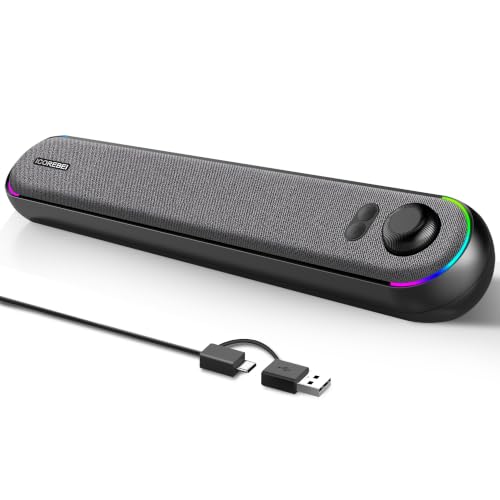
- USB-C audio and power plus Bluetooth 5.3
- Angled soundbar with dual drivers and bass radiator
- Three RGB modes with an option to turn lighting off
Best For: Desks needing both wired computer audio and Bluetooth playback
Balanced Desk Audio – Nylavee SK100 Computer Sound Bar
For shoppers comparing soundbars for desktop setups, the Nylavee SK100 is a practical stereo option with Bluetooth 5.0 and 3.5mm AUX connectivity. Its USB-powered design, side control knob, and 16-inch width make it well suited to everyday office, bedroom, and gaming desks.
Best For: Users who want flexible wired or wireless desktop audio with bass-focused stereo sound.
Pros:
- Supports Bluetooth 5.0 and 3.5mm AUX connections.
- USB powered for straightforward desktop setup.
- Four speaker units and two bass diaphragms are designed for richer highs and stronger bass.
- Side knob provides convenient control, and a built-in microphone adds versatility.
Cons:
- It requires a wired USB power connection and has no built-in battery.
- It is not waterproof or water resistant.
The Nylavee SK100 is a solid fit when simple controls, broad device compatibility, and a compact stereo soundbar format matter more than a fully cordless setup.
RGB Gaming Focus – Razer Leviathan V2 X PC Soundbar
The Razer Leviathan V2 X is one of the more gaming-oriented soundbars for desktop setups, combining a compact under-monitor design with USB-C audio and power. Bluetooth 5.0 and customizable Chroma RGB lighting add flexibility and visual appeal to a PC battlestation.
Best For: PC gamers who want compact stereo audio, low-latency Bluetooth, and customizable RGB lighting.
Pros:
- Compact form factor is designed to fit beneath a monitor.
- USB-C provides power and audio through one cable.
- Two full-range drivers and two passive radiators support dynamic stereo sound.
- Chroma RGB offers 14 lighting zones with customizable effects.
Cons:
- Its listed connectivity centers on USB-C and Bluetooth rather than 3.5mm AUX.
- It is not waterproof or water resistant.
Choose the Leviathan V2 X if gaming aesthetics and streamlined USB-C connectivity are priorities. Razer’s software controls also make it a better match for users who enjoy tuning lighting and device settings.
Cordless Desk Convenience – Bluedee Rechargeable Computer Sound Bar
The Bluedee computer sound bar stands out among soundbars for desktop setups because it can run wirelessly after charging. Bluetooth 5.3, AUX, USB flash-drive playback, and TF-card support give it broad listening flexibility, while its compact design is intended to fit beneath most monitors.
Best For: Users who want rechargeable desktop audio that can also move easily between rooms or devices.
Pros:
- Rechargeable battery provides up to 13 hours of playback at moderate volume.
- Supports Bluetooth 5.3, 3.5mm AUX, USB flash drives, and TF cards.
- Dual full-range drivers and tweeters target clear vocals and balanced sound.
- Side buttons and knobs simplify volume and playback-mode changes.
Cons:
- The USB port supports flash-drive playback only.
- It is not waterproof or water resistant.
- Wireless playback range is listed at 10 meters.
Bluedee is a particularly practical choice for flexible workspaces, dorms, and users who dislike permanent cable clutter. Its rechargeable design offers freedom without giving up wired playback options.
Lighting on a Budget – Redragon GS560 RGB Desktop Soundbar
The Redragon GS560 combines basic stereo desktop audio with a prominent RGB light show, making it a colorful option among soundbars for desktop setups. Its USB-powered, plug-and-play design and included 3.5mm cable support quick connections to PCs, laptops, TVs, and smartphones.
Best For: Budget-conscious users who want simple desktop sound with music-reactive RGB lighting.
Pros:
- Four backlight modes include dynamic and static illumination.
- Compact 16-inch bar fits beneath many desktop devices.
- USB power and 3.5mm audio support straightforward setup.
- Front volume knob includes an on/off switch for easy adjustment.
Cons:
- It is corded and USB powered rather than rechargeable or wireless.
- Its two-channel output is a basic stereo configuration.
- It is not waterproof or water resistant.
The GS560 makes the most sense when appearance matters nearly as much as audio. It delivers a compact, uncomplicated setup with lighting effects that can complement a gaming or work desk.
Best Compact Bluetooth Pick – Bluedee Computer Sound Bar
For shoppers comparing soundbars for desktop setups, the Bluedee SK010 combines a slim under-monitor profile with Bluetooth 5.0 and 3.5mm connectivity. Its USB-powered design and braided cable help keep a workspace tidy, while dual drivers and diaphragms aim to provide balanced highs and deeper bass.
Best For: Desktop users who want compact stereo sound, Bluetooth flexibility, and subtle lighting.
Pros:
- Supports both Bluetooth 5.0 and 3.5mm audio connections.
- USB-powered plug-and-play setup requires no drivers or software.
- Slim 16.4-inch design fits neatly below many monitors.
- Includes ambient light strips and anti-magnetic technology.
Cons:
- It is not waterproof or water resistant.
- Bluetooth range is listed at up to 10 meters, so wireless performance depends on placement.
- The compact form may not replace a dedicated subwoofer for users seeking powerful low-end output.
The Bluedee is a well-rounded desktop soundbar when easy connectivity and a clean footprint matter most. It is especially practical for mixed computer, gaming, and mobile-device use.
Best Clamp-On Option – XKX Monitor Speakers
The XKX116A stands out among soundbars for desktop setups because its spring clamp can attach to the top, bottom, or sides of a monitor, or the speaker can stand on a desk. Dual drivers and passive radiators are designed for clear sound with decent bass, and the front volume knob makes everyday adjustments straightforward.
Best For: Monitor-focused workstations that need flexible placement and convenient front-panel volume control.
Pros:
- Spring clamp supports several monitor mounting positions and can also stand independently.
- Front rotary knob provides smooth volume adjustment and can sync with system volume.
- G-Sensor helps maintain correct left-right channel positioning when mounted above or below a monitor.
- USB and included USB-C adapter support a broad range of computers and mobile devices.
Cons:
- USB connectivity means it does not offer Bluetooth or a 3.5mm audio input.
- The listed maximum range is 5 feet, limiting placement flexibility.
- Its 8-watt output is geared toward personal desktop listening rather than filling a large room.
This XKX speaker is a practical choice for users who value mounting flexibility over wireless connectivity. The adaptive channel switching and accessible volume knob are particularly useful in compact monitor setups.
Best Value Wired Soundbar – LENRUE G11 Computer Speakers
The LENRUE G11 is a straightforward wired choice among soundbars for desktop setups. Its compact housing fits beneath a monitor, while USB power and a 3.5mm AUX connection provide plug-and-play audio. Four amplifier IC horns are designed for distortion-free, noiseless stereo sound, and touch-activated angular lights add a gaming-oriented accent.
Best For: PC and laptop users who want compact wired audio with a physical volume knob and customizable lighting.
Pros:
- Compact 14.57-inch design is intended to fit beneath a monitor.
- USB power and 3.5mm AUX audio provide a simple plug-and-play setup.
- Top volume knob allows convenient adjustment.
- Includes a USB-C adapter and touch-controlled angular lighting.
Cons:
- No Bluetooth or other wireless communication technology.
- It has no headphone port or microphone.
- It is not compatible with TVs or headphones, according to the supplied notes.
The G11 makes sense for a dedicated computer desk where wired simplicity is more important than device versatility. Its compact shape, integrated cable design, and lighting give it a tidy gaming-desk appeal.
Best Clip-On Pick – XKX115A USB Computer Soundbar
If you want soundbars for desktop setups without giving up monitor space, the XKX115A is a practical clip-on option. It connects by USB or USB-C, uses dual stereo channels with passive radiators, and includes touch controls for volume and muting.
Best For: Compact PC, laptop, and monitor setups that benefit from a space-saving clip-on mount.
Pros:
- Clips to the top, side, or bottom of compatible monitors and can also sit on a desk.
- USB-C adapter supports newer MacBooks, Mac mini, iMac, iPad, Android devices, and tablets.
- G-sensor keeps left and right channels correctly positioned when the mounting orientation changes.
- Dual drivers and passive radiators provide stereo sound with deep bass, while touch buttons simplify control.
Cons:
- It is wired and USB-powered rather than wireless.
- It is not compatible with monitors, TVs, or projectors as listed by the manufacturer.
- Correct playback-device and audio-driver settings may be needed during setup.
The XKX115A stands out when desk space and mounting flexibility matter most. Its broad computer-device compatibility and orientation-aware channel switching make it especially convenient for monitor-centered workstations.
Best Simple Lighting – LENRUE E-1103 USB Soundbar
The LENRUE E-1103 keeps soundbars for desktop setups straightforward: connect one USB cable for power and stereo sound, then use the touch controls to manage the speaker and its lighting. Its slim tabletop form fits beneath many monitors and laptops.
Best For: Users wanting an uncomplicated, colorful USB soundbar for a desktop or laptop.
Pros:
- Single-USB plug-and-play connection requires no drivers or software.
- Includes a USB-C adapter for compatible newer devices.
- Compact 15-inch soundbar design is intended to fit under monitors or laptops.
- Touch-sensitive controls and breathing light effects add a gaming-oriented look.
Cons:
- Its 5-watt maximum output is more modest than some larger desktop speakers.
- It is not compatible with Xbox systems or projectors.
- Monitor connections require a USB port that supports both power delivery and audio output.
This LENRUE model is a sensible pick for basic desktop audio when ease of use and appearance matter more than advanced connectivity. Verify your monitor’s USB capabilities before using it as the connection point.
Best Wireless Flexibility – ICOREBEI Bluetooth Desktop Soundbar
Among soundbars for desktop setups, the ICOREBEI model is a flexible choice for listeners who want both USB audio and Bluetooth 5.3. Its angled design directs sound toward the user, while dual drivers, a bass radiator, and selectable RGB modes suit everyday work, gaming, and entertainment.
Best For: Home-office and gaming desks that need USB convenience plus Bluetooth playback.
Pros:
- Supports USB-C audio and power as well as Bluetooth wireless audio.
- Dual full-range drivers and a bass radiator provide balanced near-field stereo sound.
- Angled slim profile helps keep the desk neat and directs audio toward the listener.
- Three RGB modes can be changed or switched off.
Cons:
- Bluetooth playback still requires USB power because the soundbar has no built-in battery.
- It has a 6-watt maximum output, so it is designed for desktop listening rather than large-room sound.
- Bluetooth range is specified up to 10 meters in open conditions, which may vary indoors.
The ICOREBEI offers the broadest listening options of these three products. Choose it if switching between a computer and Bluetooth device is useful, while keeping in mind that a power cable remains necessary.
How We Picked the Best Soundbars for Desktop Setups
We focused on compact desktop speakers designed to sit beneath or beside a monitor. The selection covers wired USB and AUX models, Bluetooth soundbars, rechargeable options, and gaming-focused designs. We also considered practical details such as control placement, power requirements, lighting, compatibility, and whether a speaker is suitable for a small home-office desk.
Because compact soundbars vary widely in hardware and features, the right choice depends on your setup rather than specifications alone. A USB-powered model may be ideal for a laptop or office PC, while Bluetooth can be more convenient for switching between a computer and phone.
Quick Comparison
| Best For | Look For | Typical Advantage |
|---|---|---|
| Basic desktop audio | USB power and AUX input | Simple, reliable setup |
| Gaming desks | Full-range drivers and lighting | More engaging sound and appearance |
| Minimal cable clutter | Bluetooth connectivity | Flexible device pairing |
| Small or shared spaces | Compact housing and easy controls | Efficient use of desk room |
| Mobile workstations | Rechargeable battery | Portable placement without constant power |
Key Buying Factors for Soundbars for Desktop Setups
Connection and Power
Check whether the soundbar uses USB for power, USB-C, AUX, Bluetooth, or a combination. USB-powered speakers usually need a computer, hub, or wall adapter for power, while AUX carries audio separately. Bluetooth reduces cables but may introduce pairing steps or latency.
Size and Monitor Clearance
Measure the space beneath your monitor, including the stand base and any front-facing controls. A narrow soundbar can preserve room for a keyboard and mouse, but a taller model may block the display or require moving the monitor higher.
Sound and Volume Control
Look for a conveniently placed knob or touch control if you frequently adjust volume. Compact speakers are best suited to near-field listening, so prioritize clear vocals, balanced midrange, and clean output at your normal desk distance rather than expecting room-filling bass.
Lighting and Extras
RGB lighting, touch controls, and Bluetooth can make a soundbar more appealing, particularly for gaming setups. They should remain secondary to sound quality, connectivity, and ease of use unless appearance is a major priority.
Who Should Buy Which Soundbars for Desktop Setups?
Choose a straightforward USB or AUX soundbar if you want dependable audio for calls, videos, music, and general work with minimal setup. Bluetooth models are better for users who regularly switch between a computer, tablet, or phone. Gamers may prefer a model with fuller drivers, easy-access controls, or synchronized lighting. If your desk is especially small, prioritize the narrowest design that fits beneath your monitor. A rechargeable option makes the most sense for flexible placement or occasional use away from a permanent workstation.