The best smart locks for seniors make everyday entry simpler without sacrificing home security. Fingerprint readers, PIN codes, auto-locking, and remote access can reduce the need to carry or find keys.
This roundup compares 10 options with different installation requirements, connectivity features, access methods, and backup-entry choices so you can find a lock that fits the user and the door.
Best 10 Smart Locks for Seniors Picks for 2026
Flexible Family Entry

- Fingerprint, keypad, fob, app, and key entry
- Backlit keypad with temporary code support
- Bluetooth included; Wi-Fi gateway sold separately
Best For: Families and seniors wanting multiple entry options
Remote-Control Pick
ULTRALOQ Bolt SE Wi-Fi Deadbolt

- Built-in Wi-Fi for remote lock control
- Stores up to 50 fingerprints and codes
- Up to 18 months of claimed battery life
Best For: Caregivers and families needing remote access
App-Managed Choice
Yamiry Fingerprint Door Handle Lock

- Six entry methods, including fingerprint and key fob
- Two fobs and two mechanical keys included
- Temporary codes and unlock records via app
Best For: Homes and rentals needing flexible access management
Fast Biometric Entry

- Fingerprint unlocking claimed at about 0.5 seconds
- Built-in Wi-Fi for Wyze app control
- USB-C emergency power and physical keys
Best For: Users prioritizing fast fingerprint access
Most Connected Pick

- Five entry methods, including fingerprint and physical key
- Built-in Wi-Fi enables remote access without a hub
- Supports up to 100 passcodes and access alerts
Best For: Families wanting remote access and flexible entry options
Best for Caregiver Management

- Manage users and permissions through the KK Home App
- Offers flexible temporary and recurring access codes
- Local encrypted storage with alerts and activity logs
Best For: Caregivers and families managing frequent visitors
Best Value for Flexible Entry
Sifely S Fingerprint Handle Lock

- Five local entry methods, including fingerprint and RFID fob
- Supports flexible codes, auto-lock, and privacy modes
- Optional gateway adds remote and voice-control features
Best For: Homes needing a handle-style lock with versatile local access
Most Feature-Rich
myQ Secure View 3-in-1 Smart Lock
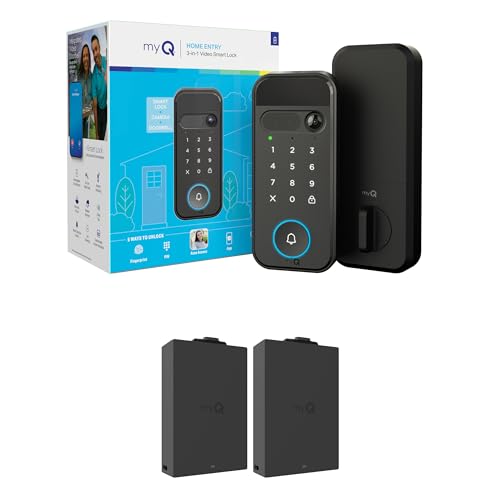
- Combines smart lock, doorbell, and camera
- Five entry methods, including face and fingerprint
- Remote video, alerts, and two-way audio
Best For: Families wanting entry flexibility and visitor monitoring
Best Integrated Wi-Fi Option
Philips 4200 Series WiFi Smart Lock

- Built-in Wi-Fi works without a separate hub
- Fingerprint, keypad, app, voice, and key entry
- Includes a matching handle set and auto-lock
Best For: Households wanting remote control with simple access management
Best Simple Pick
Sifely Fingerprint Smart Deadbolt

- Five entry methods, including fingerprint and key fob
- Supports many users, codes, and scheduled permissions
- Optional gateway enables remote and voice control
Best For: Shared homes needing customizable everyday access
Flexible Family Entry – Fingerprint Handle Smart Lock
For households comparing smart locks for seniors, this handle-style model offers several straightforward ways to enter, including fingerprint, keypad, RFID fob, Bluetooth app, and a mechanical key. Its backlit keypad, auto-lock option, and reversible lever can make everyday access easier for family members using compatible US doors.
Best For: Families, seniors, shared homes, guest rooms, rentals, and compatible doors where multiple entry methods are useful.
Pros:
- Provides fingerprint, PIN, RFID fob, app, and key entry options.
- Backlit keypad and anti-peeping password feature support easier, more private code entry.
- Supports temporary or scheduled codes and activity logs through the Bluetooth app.
- DIY installation is designed for compatible 1-3/8- to 2-1/4-inch-thick US doors.
Cons:
- Standard operation uses local Bluetooth; remote access requires a separately sold Wi-Fi gateway.
- RFID fob inclusion varies by package.
- Door compatibility should be checked before installation.
This is a versatile choice when seniors or other household members may prefer different access methods. The main limitation is that internet-based control and supported voice features require an additional gateway.
Remote-Control Pick – ULTRALOQ Bolt SE Wi-Fi Deadbolt
Among smart locks for seniors, the ULTRALOQ Bolt SE stands out for built-in Wi-Fi remote control and several keyless entry choices. Fingerprints, passcodes, app access, shared eKeys, voice control, and mechanical keys give households flexibility, while real-time alerts and activity history help with access management.
Best For: Seniors and families who want remote access, fingerprint entry, shared codes, and smart-home compatibility without a standard lock hub.
Pros:
- Built-in 2.4 GHz Wi-Fi supports remote locking, unlocking, notifications, and access management.
- Stores up to 50 fingerprints and 50 passcodes.
- Works with Siri, Alexa, and Google Assistant, with Matter over Thread support when paired with a compatible hub.
- Offers auto-lock, low-battery alerts, and a claimed battery life of up to 18 months.
Cons:
- Matter remote access requires a compatible Matter over Thread hub.
- A door sensor is not included.
- Wi-Fi operation is limited to 2.4 GHz and depends on suitable router range.
This model is a strong fit for caregivers or family members who want to manage access from elsewhere. Its broad feature set is appealing, though buyers should account for the required hub for Matter features and verify Wi-Fi placement.
App-Managed Choice – Yamiry Fingerprint Door Handle Lock
This Yamiry model is a practical option for shoppers seeking smart locks for seniors with both familiar and digital entry methods. It combines fingerprint recognition, passcodes, key fobs, mechanical keys, and app control in a handle-style design intended for many standard American wooden doors.
Best For: Seniors, families, landlords, and indoor or exterior-door users who want app-managed access plus physical backup options.
Pros:
- Offers six entry methods, including fingerprint, app, passcode, fob, key, and supported voice features.
- Includes two key fobs and two mechanical keys.
- App can create permanent or temporary access and track unlock records.
- Designed for screwdriver installation with a reversible handle and adjustable latch.
Cons:
- Remote control and Alexa unlock require a separately sold Wi-Fi gateway.
- Compatibility should be confirmed for the specific existing door and opening.
- Its app-management features may be more than needed for a simple single-user entry setup.
The Yamiry is well suited to homes that want a physical key and fob backup alongside fingerprint access. It also makes sense for rental or family access management, but remote functions add the cost and setup of an optional gateway.
Fast Biometric Entry – WYZE Auto-Lock Bolt v2
For seniors who prefer a quick, uncomplicated entry method, the WYZE Auto-Lock Bolt v2 pairs a fingerprint scanner with app, code, and physical-key access. Built-in Wi-Fi enables remote checking and management, while the USB-C emergency power option helps provide access if the batteries run out.
Best For: Home users who prioritize fast fingerprint entry, built-in Wi-Fi, and a physical emergency backup.
Pros:
- Fingerprint scanner is designed to unlock in about 0.5 seconds.
- Includes app, keypad, fingerprint, and physical-key entry options.
- Built-in Wi-Fi supports remote lock management through the Wyze app.
- USB-C emergency power and included AA batteries provide backup options.
Cons:
- Claimed battery life is up to eight months, shorter than some competing models listed here.
- It is a deadbolt rather than a handle-style lock, so door hardware compatibility matters.
- Remote video-feed unlocking requires pairing with a Wyze Video Doorbell.
This is a focused choice for seniors who value fast biometric access and remote app control. Its emergency USB-C power feature is reassuring, though buyers should plan for battery replacement and confirm the existing deadbolt fit.
Most Connected Pick – Philips Wi-Fi Smart Deadbolt
For shoppers comparing smart locks for seniors, the Philips Wi-Fi Smart Deadbolt offers several convenient ways to enter, including fingerprint, passcode, app, voice control, and a physical key. Built-in Wi-Fi enables remote access without an additional hub, although it requires a 2.4GHz network.
Best For: Families who want remote control, multiple entry methods, and access alerts.
Pros:
- Supports fingerprint, passcode, app, physical-key, and Alexa or Google Assistant entry.
- Built-in Wi-Fi allows remote locking and unlocking without a separate hub.
- Stores up to 100 custom passcodes and provides access history and real-time alerts.
- Auto-lock timing can be set from 10 to 180 seconds.
Cons:
- AA alkaline batteries are required but not included.
- Supports only 2.4GHz Wi-Fi, with the router and lock recommended within 65 feet.
- It does not include a door sensor.
This is a flexible choice when a senior and their caregivers need different ways to unlock the door. Remote access and notifications are useful for family oversight, while the fingerprint option can reduce reliance on keys or memorized codes.
Best for Caregiver Management – Veise VE017 Fingerprint Lock
The Veise VE017 is a strong option among smart locks for seniors when family members or caregivers need to manage access remotely. Its app supports permissions, temporary codes, activity logs, and alerts, while fingerprint entry provides a quick key-free option at the door.
Best For: Homes with caregivers, sitters, guests, or multiple authorized users.
Pros:
- Offers fingerprint, app, codes, fob card, mechanical key, and other listed access options.
- Remote user management allows access to be granted, paused, changed, or deleted.
- Supports permanent, recurring, duration-based, and one-time codes.
- Stores access data locally with AES128 encryption and provides activity logs and alerts.
Cons:
- Alexa and Google Assistant compatibility requires the G1 Gateway, which is not included in the supplied notes.
- Fingerprint, app, and advanced access features may require setup and ongoing battery monitoring.
The VE017 stands out for households where someone else may need to coordinate entry from a distance. Its combination of fast fingerprint access and detailed user controls can simplify daily visits without distributing physical keys.
Best Value for Flexible Entry – Sifely S Fingerprint Handle Lock
The Sifely S combines a lever handle with fingerprint, keypad, Bluetooth app, RFID fob, and mechanical-key entry. For smart locks for seniors, that variety can be useful when different household members prefer different access methods, but note that the standard model uses Bluetooth locally rather than built-in Wi-Fi.
Best For: Households wanting a handle-style lock with several local entry options.
Pros:
- Provides five listed unlock methods, including fingerprint, PIN, Bluetooth app, RFID fob, and key.
- Supports permanent, timed, one-time, and recurring passcodes with anti-peeping entry.
- Includes auto-lock, Passage Mode, Privacy Mode, low-battery alerts, and emergency micro-USB power.
- Reversible handle fits compatible left- or right-handed doors.
Cons:
- The standard model has local Bluetooth only; remote control and voice features require a separate Sifely Wi-Fi Gateway.
- Four AA batteries are required but not included.
- Door dimensions, bore, and backset must be checked before installation.
This lock is practical for seniors who want fingerprint access but also appreciate a familiar handle and physical-key backup. It offers broad day-to-day flexibility, provided the existing door matches its installation requirements and remote access is not needed without the optional gateway.
Most Feature-Rich – myQ Secure View 3-in-1 Smart Lock
For shoppers comparing smart locks for seniors, the myQ Secure View combines several entry and monitoring tools in one device. Facial recognition, fingerprint access, PINs, app control, and a physical key give households multiple ways to get inside, while the integrated camera and doorbell help caregivers see visitors remotely.
Best For: Families who want remote entry control plus doorbell video and multiple hands-free access options.
Pros:
- Combines a deadbolt, video doorbell, and 2K HDR camera.
- Offers face, fingerprint, PIN, app, and key entry.
- Provides motion and doorbell alerts, color night vision, and two-way audio.
- Includes an extra rechargeable battery.
Cons:
- Face and fingerprint recognition are unavailable in Illinois, Texas, and outside the U.S./Canada.
- At 5.5 pounds, the unit may be relatively substantial compared with a basic deadbolt.
This is the most comprehensive option here for seniors who benefit from both flexible entry and visual oversight. Its advanced features may be more than needed if you only want straightforward keypad access.
Best Integrated Wi-Fi Option – Philips 4200 Series WiFi Smart Lock
The Philips 4200 Series is a practical choice among smart locks for seniors because it connects directly to 2.4GHz Wi-Fi without a separate hub. Fingerprint entry, a back-lit keypad, voice control, remote status checks, and adjustable auto-lock settings can simplify everyday access and reduce worries about an unlocked door.
Best For: Seniors and families seeking built-in Wi-Fi, fingerprint access, and a complete handle set.
Pros:
- No additional hub or bridge is required for Wi-Fi control.
- Unlocks by fingerprint, PIN, app, voice command, or key.
- Supports permanent, one-time, periodic, and recurring passcodes.
- Includes matching door handles and adjustable auto-lock timing.
Cons:
- Requires eight AA alkaline batteries, which are not included.
- Works with 2.4GHz Wi-Fi and requires an activation reset-button step.
- Compatibility is specified for doors 1-3/8 to 1-3/4 inches thick.
With its direct Wi-Fi connection and broad code-management options, this model is well suited to households coordinating access for relatives, caregivers, or guests. Confirm door dimensions and plan for the initial battery installation before buying.
Best Simple Pick – Sifely Fingerprint Smart Deadbolt
The Sifely fingerprint deadbolt offers a straightforward mix of biometric and traditional access for households considering smart locks for seniors. Fingerprints, codes, key fobs, a smartphone app, and mechanical keys provide alternatives if one method is inconvenient, while auto-lock and low-battery alerts add everyday practicality.
Best For: Families, apartments, and shared homes that need several access methods and programmable permissions.
Pros:
- Provides fingerprint, keypad, app, key fob, and mechanical-key entry.
- Stores over 100 fingerprints and over 100 access codes.
- Supports auto-lock, privacy mode, passage mode, and anti-peeping passcodes.
- Offers scheduled access, electronic key sharing, access logs, and low-battery alerts.
Cons:
- Remote access requires the Sifely Wi-Fi Gateway, sold separately.
- Alexa and Google Assistant compatibility also depends on the optional gateway.
- The supplied notes do not specify the complete finish or dimensions.
This model stands out when multiple family members, caregivers, or tenants need personalized access. It is especially flexible locally over Bluetooth, but budget for the optional gateway if remote management or voice control is important.
How We Picked the Best Smart Locks for Seniors
We focused on practical features that can make a meaningful difference for older adults and their caregivers: straightforward unlocking, readable keypads, reliable backup access, manageable installation, and useful remote-control options. Fingerprint recognition and PIN entry can be easier than handling small keys, while app and Wi-Fi connectivity may help family members check or manage access from elsewhere.
We also considered the trade-offs between deadbolts and handle-style locks, battery-powered operation, auto-lock settings, compatibility with common US doors, and whether a model supports multiple entry methods. Before buying, confirm the lock’s door measurements and required hardware.
Quick Comparison
| Feature | Best for | What to check |
|---|---|---|
| Fingerprint unlock | Fast, key-free entry | Reader reliability and enrolled fingerprints |
| Keypad access | Users who prefer codes | Button size, visibility, and code management |
| Bluetooth | Nearby phone control | Whether remote access requires a hub or Wi-Fi |
| Built-in Wi-Fi | Caregiver monitoring and remote control | Network compatibility and battery impact |
| Handle lock | Replacing a full door handle set | Door preparation and backset measurements |
Key Buying Factors for Smart Locks for Seniors
Choose the Simplest Reliable Entry Method
Fingerprint unlocking is convenient, but no biometric reader is perfect in every situation. A large, easy-to-read keypad and a physical key or RFID fob provide valuable alternatives. Choose a model with at least two practical entry methods rather than relying on one feature alone.
Check Fit and Installation
Measure the door thickness, backset, borehole, and available clearance before ordering. Deadbolt replacements are often simpler when the existing hardware matches the required dimensions. Handle-style models may require more extensive replacement work.
Balance Connectivity and Battery Life
Bluetooth models can be sufficient for local control and may use less power. Wi-Fi models are more useful when a caregiver needs remote locking, temporary codes, or activity notifications, but they can require stronger network coverage and more frequent battery changes.
Plan for Emergencies
Look for low-battery warnings, an exterior backup power option, and a dependable physical key or alternate credential. Keep emergency access instructions available for trusted family members or caregivers.
Who Should Buy Which Smart Locks for Seniors?
Choose a fingerprint-and-keypad model for someone who wants quick entry with minimal phone use. A Wi-Fi deadbolt is better for caregivers who need remote access or status checks. A handle-style lock suits doors where the entire handle assembly needs replacement. For households wanting video verification as well as entry control, a combination lock and doorbell camera can provide broader oversight.