The right office door lock can make access easier without sacrificing control. This roundup compares 10 smart locks with options such as fingerprint recognition, PIN codes, RFID key fobs, mobile apps, and remote unlocking.
Whether you manage a private office, rental workspace, or small business, focus on compatibility, user management, connectivity, and reliable backup entry before choosing a model.
Best 10 Smart Lock for Office Picks for 2026
Versatile Access

- Five entry methods, including fingerprint and RFID
- Flexible timed and recurring passcodes
- Wi-Fi remote control requires an optional gateway
Best For: Homes, offices, and rentals needing multiple access methods
Connected Convenience

- Built-in 2.4GHz Wi-Fi needs no hub
- Remote app control and access history
- Fast fingerprint entry with adjustable auto-lock
Best For: Offices and rentals needing direct remote management
Interior Office Pick
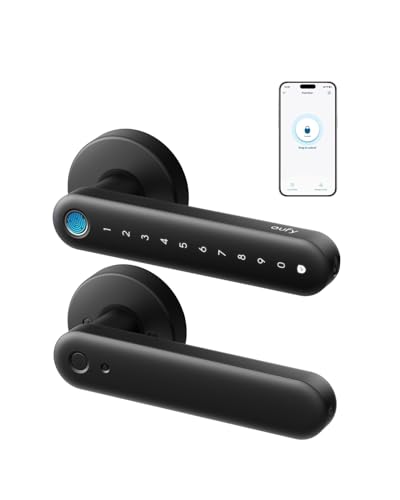
- 0.3-second fingerprint unlocking
- Built-in Wi-Fi with app and voice control
- Not recommended for front doors
Best For: Interior office, storage, bedroom, and side doors
Full Lockset Upgrade
Smart Keypad Door Lock with Handle

- Long panel covers existing lockset holes
- Seven access methods, including fingerprints and fobs
- Remote and voice control require a Wi-Fi gateway
Best For: Front-door replacements in homes, offices, and rentals
Best Smart Office Knob
DESLOC D212 WiFi Fingerprint Lock

- Fingerprint, passcode, app, Wi-Fi, and key access
- Remote codes, activity records, and user permissions
- Aluminum body with IPX4 and BHMA Grade 3 ratings
Best For: Private offices and shared spaces needing flexible remote access
Best Easy-Install Office Lock

- No-drill installation in about 15 minutes
- Wi-Fi remote access, notifications, and event history
- Fingerprint, keypad, and auto-lock entry options
Best For: Compatible office doors needing simple installation and monitoring
Best Multi-Access Pick
Yamiry Keypad Fingerprint Door Handle

- Six entry methods, including fingerprints and passcodes
- App supports temporary codes and access records
- Screwdriver installation with reversible handle
Best For: Offices and property managers needing flexible access control
Best Fast-Entry Option
OLUMAT Fingerprint Smart Door Lock

- Fingerprint access is designed to unlock in about one second
- Supports codes, fobs, app control, and physical keys
- Auto-lock and reversible-handle design
Best For: Small offices prioritizing quick biometric entry
Best for Managed Access

- Eight entry methods, including IC cards and eKeys
- Optional gateway supports remote controls and access logs
- IP64 rating and -35°F to 122°F operating range
Best For: Offices and property managers with changing access needs
Versatile Access – Sifely Fingerprint Smart Lock
For buyers seeking a smart lock for office or home use, the Sifely S offers several entry methods in one handle set. Fingerprint access, PIN codes, Bluetooth control, RFID key fobs, and a backup key make it adaptable for authorized users, guests, and rental properties.
Best For: Homes, apartments, bedrooms, offices, and rental properties that need flexible local access management.
Pros:
- Supports fingerprint, keypad, Bluetooth app, RFID, and mechanical-key entry.
- Offers permanent, timed, one-time, and recurring passcodes.
- Includes auto-lock, Passage Mode, Privacy Mode, and access-history syncing.
- Reversible handle and DIY installation support compatible US door dimensions.
Cons:
- Standard Model S uses local Bluetooth and requires a separately sold Wi-Fi gateway for remote control.
- Four AA batteries are required but not included.
- Door thickness, bore, and backset must match the listed compatibility requirements.
This is a versatile choice when an office or rental needs multiple credential types without committing to a built-in Wi-Fi lock. Verify the door measurements and budget for the gateway if internet-based access is important.
Connected Convenience – Philips WiFi Keypad Deadbolt
The Philips 4200 Series is a smart lock for office, home, or rental users who want built-in Wi-Fi rather than a separate hub. Its app supports remote locking, user management, fingerprints, access history, and real-time status checks, while the included handle set creates an all-in-one upgrade.
Best For: Users who want direct 2.4GHz Wi-Fi access management, remote control, and a complete handle-and-deadbolt set.
Pros:
- Built-in Wi-Fi enables remote control without an extra hub.
- Supports permanent, one-time, periodic, and recurring PIN codes.
- Provides 0.3-second fingerprint access and app-based access history.
- Includes adjustable auto-lock timing and Alexa or Google Assistant compatibility.
Cons:
- Requires a 2.4GHz Wi-Fi connection and recommends keeping the lock within 33 feet of the router.
- Batteries are not included, and rechargeable or high-power lithium batteries are not recommended.
- Installation requires attention to door handing and wire placement.
With built-in Wi-Fi and a full handle set, this Philips model is convenient for workplaces or rentals where remote authorization matters. Check router placement and door compatibility before installation.
Interior Office Pick – eufy FamiLock C32
The eufy Security FamiLock C32 is a practical smart lock for office interiors, bedrooms, storerooms, and side doors. It combines fast fingerprint recognition with built-in Wi-Fi, app control, auto-lock, and voice-assistant support, though the manufacturer does not recommend it for front doors.
Best For: Interior office doors, bedrooms, storage rooms, garage entries, and other non-front-door applications.
Pros:
- Large-area fingerprint sensor unlocks in about 0.3 seconds.
- Built-in 2.4GHz Wi-Fi supports remote authorization and management.
- Works with Alexa and Google Assistant.
- Includes four AA batteries and a USB-C emergency power option.
Cons:
- Not recommended for front-door use.
- Rekeying is not supported.
- Its stated fit is focused on standard interior doors.
For an office suite or internal room, the C32 offers a strong balance of quick biometric entry and remote administration. Choose another model if you need a front-door lock or rekeying capability.
Full Lockset Upgrade – Smart Keypad Door Lock with Handle
This H3B smart lock is designed for buyers replacing an entire front-door lockset rather than installing a small keypad alone. Its extra-long panel covers single- or double-hole setups, while fingerprint, keypad, app, key-fob, key, remote, and optional voice access provide flexibility for homes, offices, and rentals.
Best For: Front-door lockset replacements that need broad hole coverage, multiple credentials, and app-based access management.
Pros:
- Extra-long 9.25-inch panel helps cover existing deadbolt and handle holes.
- Offers seven access options, including fingerprint, keypad, app, key fob, and physical key.
- Supports remote locking, temporary or scheduled codes, and activity checking.
- Includes five physical keys, five key fobs, a two-year warranty, and 24/7 support.
Cons:
- Voice control and remote access require a Wi-Fi gateway.
- Its larger 4.3-pound lockset may be more substantial than a basic replacement.
- Compatibility should be checked for the specific existing hole configuration.
The H3B is especially useful when a front-door upgrade must conceal old hardware openings while adding modern credentials. It is a compelling fit for offices or rentals, provided the existing lockset layout matches.
Best Smart Office Knob – DESLOC D212 WiFi Fingerprint Lock
The DESLOC D212 is a practical smart lock for office doors that need several keyless entry options. Fingerprint access, passcodes, app control, Wi-Fi connectivity, and backup keys make it suitable for a private office or shared workspace, while remote management lets you create temporary codes and review activity.
Best For: Private offices, home offices, and side-entry doors needing remote access management.
Pros:
- Supports fingerprints, passcodes, app control, and mechanical keys.
- Built-in Wi-Fi enables remote locking, activity records, temporary codes, and user permissions.
- Solid aluminum alloy body, tempered glass keypad, IPX4 water resistance, and BHMA Grade 3 certification.
- Adjustable auto-lock timer from 5 to 120 seconds.
Cons:
- The knob format is intended for compatible standard doors rather than every commercial door configuration.
- Fingerprint data is stored locally, but users should still confirm app and Wi-Fi requirements before installation.
Choose the D212 when your office benefits from biometric entry and centralized access controls in a familiar door-knob design. Its auto-lock and temporary-code features are especially useful for shared or occasionally accessed spaces.
Best Easy-Install Office Lock – eufy Security Smart Lock C33
The eufy Security Smart Lock C33 is a convenient smart lock for office doors where quick installation and app-based management matter. Its integrated Wi-Fi supports remote access, notifications, and event history, while fingerprint recognition and a backlit keypad provide straightforward everyday entry.
Best For: Office, garage, side, or basement doors where no-drill installation and remote monitoring are priorities.
Pros:
- Fingerprint recognition works with an integrated handle grip.
- Built-in Wi-Fi provides remote control, access management, notifications, and event history.
- Installs in about 15 minutes without drilling and works with left- and right-hand doors.
- Includes auto-lock, anti-peeping passwords, and a backlit keypad.
Cons:
- Power comes from eight AA batteries, so battery maintenance is part of ownership.
- Its listed lock type is a deadbolt, which may not suit offices using other door hardware.
The C33 is a strong fit for an office manager who wants a relatively simple installation and useful remote-access features. Verify that the existing door accepts a compatible deadbolt before ordering.
Best Multi-Entry Office Lock – Keyless RFID Keypad Door Lock
This keyless entry lock is a practical smart lock for office, clinic, retail, and light commercial doors that need multiple physical access methods. Users can enter with a PIN, RFID key fob, remote control, or metal key, making it useful when staff or guests need different ways to access the same door.
Best For: Light commercial offices and rental spaces needing PIN, RFID, remote, and key entry.
Pros:
- Offers four entry modes: PIN code, RFID card, remote control, and physical key.
- Includes four key fobs, one remote control, two metal keys, and a standard 60 mm latch.
- Zinc alloy construction is designed for residential and light commercial use.
Cons:
- Requires drilling one hole and fits doors 35 to 60 mm thick; compatibility must be checked carefully.
- It is not waterproof and is not recommended where it will receive direct outdoor water exposure.
- The included metal keys cannot be replaced or copied, according to the supplied notes.
This model makes sense when an office needs straightforward credential sharing without relying on app-based control. Check the door thickness, backset, latch, and indoor installation conditions before purchasing.
Best Multi-Access Pick – Yamiry Keypad Fingerprint Door Handle
For buyers comparing a smart lock for office use, the Yamiry YR01 stands out with fingerprint access, app control, passcodes, key fobs, mechanical keys, and optional Alexa functions. Its app also supports temporary codes and unlock-history tracking, which can simplify access management for small teams or multiple properties.
Best For: Offices, landlords, and property managers who want several entry methods and app-based access control.
Pros:
- Offers six access methods, including fingerprints, passcodes, fobs, keys, and Bluetooth app control.
- Supports permanent or temporary access, one-time codes, and unlock-record monitoring through the app.
- Designed for screwdriver-only installation on most standard American wooden doors, with a reversible handle.
Cons:
- Remote control and Alexa features require a separately sold Wi-Fi gateway.
- Its listed compatibility is focused on standard American wooden doors.
The YR01 is a flexible choice when an office needs multiple credential options and centralized access administration. Confirm door compatibility and budget for the optional gateway if remote operation is important.
Best Fast-Entry Option – OLUMAT Fingerprint Smart Door Lock
The OLUMAT B22 is a practical smart lock for office doors that need quick biometric entry without a complicated installation. Its fingerprint sensor is designed to unlock in about one second, while passcodes, fobs, the app, and physical keys provide alternatives for staff and visitors.
Best For: Small offices, stores, rentals, and other spaces where fast fingerprint access and auto-locking are priorities.
Pros:
- Provides fingerprint, passcode, fob, app, and physical-key entry.
- Fingerprint unlocking is designed for quick access in about one second.
- Includes auto-lock, anti-peeping password support, and a reversible handle.
- Installs with a screwdriver without extra drilling, according to the supplied notes.
Cons:
- Remote locking, remote codes, access logs, and Alexa control require the optional Wi-Fi gateway.
- The lock’s size may interfere with storm doors.
With its quick fingerprint reader and broad entry-method support, the B22 suits offices that want convenient daily access. Check the door setup carefully, especially if a storm door is present, and account for the optional gateway for remote features.
Best for Managed Access – MSR X6 8-in-1 Smart Door Lock
The MSR X6 is a strong smart lock for office or rental environments that need extensive credential flexibility and detailed access administration. It supports fingerprints, keypad codes, IC cards, shared eKeys, auto-unlock, and mechanical keys, while the TTLock app can provide remote controls and real-time records when paired with the optional G2 Wi-Fi gateway.
Best For: Offices, rental hosts, and multi-property managers handling frequent staff, tenant, or visitor access changes.
Pros:
- Offers eight access options, including fingerprints, keypad codes, IC cards, eKeys, and physical keys.
- Optional gateway enables remote locking, code management, authorization, and access-log monitoring.
- Designed for temperatures from -35°F to 122°F and rated IP64 waterproof.
- Installs with a screwdriver in about 10 minutes and includes a reversible handle.
Cons:
- Remote app functions and Alexa voice control require the separately sold G2 Wi-Fi gateway.
- The extensive feature set may be more than a single low-traffic office needs.
The X6 is particularly useful when an organization needs several ways to issue access and keep track of entry activity. Its weather-resistance claims broaden placement options, but buyers should verify door fit and include the gateway if off-site management is required.
How We Picked the Best Smart Lock for Office
We focused on the features that matter most in an office environment: dependable keyless entry, practical access control, installation compatibility, and useful connectivity. The selected locks include keypad, fingerprint, RFID, Bluetooth, and Wi-Fi models so you can match the lock to your building, team size, and management style.
We also considered whether each design includes a physical key override, app-based control, remote access, a handle or knob, and a straightforward installation path. Always confirm door thickness, backset, bore-hole size, and whether the product is designed for an exterior entry door or an interior office door.
Quick Comparison
| Feature | Best for | What to look for |
|---|---|---|
| Fingerprint entry | Fast individual access | Recognition reliability and user capacity |
| Keypad entry | Shared offices and visitors | Temporary codes and auto-lock settings |
| Wi-Fi connectivity | Remote management | App quality, notifications, and network requirements |
| Bluetooth connectivity | Nearby phone-based control | Range and whether a hub is required |
| RFID key fobs | Simple team access | Included fobs and replacement availability |
Key Buying Factors for a Smart Lock for Office Use
Door and Hardware Compatibility
Check the lock type before buying. A deadbolt replacement is not interchangeable with a lever, knob, or complete handle set. Measure your existing hardware and verify the door opens in the required direction.
Access Management
For an office, individual PINs are usually more useful than one shared code. Fingerprint storage can speed up daily entry, while temporary codes help contractors, cleaners, and visitors. Look for easy ways to delete users when staff roles change.
Connectivity and Remote Control
Wi-Fi models can support remote unlocking, activity alerts, and access management away from the property. Bluetooth locks may be simpler and more private, but they typically offer less remote functionality unless paired with a separate hub.
Power and Backup Access
Review battery type, low-battery warnings, emergency power options, and physical key access. A smart lock should not leave staff stranded because of a depleted battery or a temporary connection failure.
Security and Daily Convenience
Useful features include automatic locking, tamper alerts, durable exterior construction, and a manual privacy or passage setting where appropriate. Convenience should support, not replace, your office’s broader security procedures.
Who Should Buy Which Smart Lock for Office?
Choose a fingerprint model if a small, consistent team needs fast entry without remembering codes. A keypad lock is often the most flexible choice for shared offices, service providers, and spaces with rotating users. Select Wi-Fi connectivity if you need to manage access remotely or receive activity notifications.
RFID-equipped locks suit teams that prefer physical credentials, while Bluetooth models can work well for offices where employees already use smartphones and access is mostly local. For rentals or mixed-use properties, prioritize temporary codes, remote management, and a dependable physical-key override.