When it comes to creating a productive workspace, the right office workstation can make all the difference. In 2026, you’ll find that ergonomic designs are at the forefront, tailored to enhance both comfort and efficiency. From height-adjustable options to smart storage solutions, these workstations cater to diverse needs. But what features should you really look for? Let’s explore the top contenders that could transform your work experience.
JOY worker Standing Desk Converter (35″ Wide, Height Adjustable)

The JOY worker Standing Desk Converter is ideal for professionals who want to seamlessly switch between sitting and standing throughout their workday. With a 35″ width and height adjustment from 4.9” to 19.3”, it’s perfect for creating an ergonomic workspace. You can easily accommodate dual monitors on the top tier, while the removable keyboard tray syncs to your preferred height. Weighing just 26.5 pounds, it’s simple to set up with minimal assembly. This desk converter not only supports better posture but also helps reduce back pain, making it a smart choice for any home or office setting.
Best For: Professionals seeking an ergonomic workspace that allows for easy transitions between sitting and standing throughout the workday.
Pros:
- Height Adjustable: Easily elevates from 4.9” to 19.3” to suit individual preferences.
- Dual Layer Design: Accommodates dual monitors with a removable keyboard tray that raises in sync.
- Minimal Assembly Required: Quick and easy setup with just a 2-step installation process.
Cons:
- Weight Capacity Limits: Top tier supports up to 28.6 lbs, which may not accommodate heavier equipment.
- No Assembly Tools Included: Users must provide their own tools for assembly, which may be inconvenient.
- Limited Warranty Details: More information on the warranty is available only upon request, which may not be ideal for all buyers.
Worky 15-in-1 Home Office Portable Workstation Desk

If you’re a remote worker seeking versatility, the Worky 15-in-1 Home Office Portable Workstation Desk might just be your ideal solution. This modern, rectangular desk measures 3.5″ D x 26″ W x 16.5″ H and weighs only 14 lbs, making it easy to move. With a built-in power hub, you can charge your devices while working. The adjustable LED video conference light enhances your presence during calls, while the magnetic dry erase board keeps your ideas organized. Plus, dedicated compartments help manage cables and accessories. Experience an efficient workspace that transforms any area into your productive haven.
Best For: Remote workers and individuals seeking a versatile and portable workstation for home or small spaces.
Pros:
- Transformative Design: Easily converts any space into a functional home office.
- Integrated Charging Hub: Features USB-A and USB-C ports for convenient device charging.
- Enhanced Video Conferencing: Built-in adjustable LED light improves visibility during online meetings.
Cons:
- Assembly Required: The desk needs assembly with basic tools not included.
- Limited Customization: The design is not customizable for personal preferences.
- Weight Limitations: Designed to accommodate laptops up to 15.6 inches, which may not suit larger devices.
SAINTCY 3 Person Office Cubicle Desk Workstation

Designed for collaborative teams, the SAINTCY 3 Person Office Cubicle Desk Workstation offers a modern solution to enhance productivity in shared environments. Measuring 62.99 inches square, its modular design allows you to configure it for single, dual, or triple setups. The robust desk options guarantee stability, while adjustable wall partitions minimize distractions. You’ll appreciate the integrated power hub with AC outlets and USB ports, keeping your devices charged and organized. Crafted with durable engineered wood and stylish fabric panels, this workstation not only looks professional but also promotes an efficient workspace. Enjoy 24-hour customer support and a warranty for added peace of mind.
Best For: Teams seeking a collaborative workspace solution that maximizes productivity while maintaining a professional appearance.
Pros:
- Modular design allows for flexible configurations to accommodate different team sizes.
- Integrated power hub with AC outlets and USB ports keeps devices charged and organized.
- Adjustable wall partitions minimize distractions and enhance collaboration among team members.
Cons:
- Assembly required, which may be time-consuming for some users.
- Limited color options, as it only comes in black with fabric panels.
- Size may not fit smaller office spaces, requiring adequate room for setup.
ONKRON Mobile Laptop Cart on Wheels

For professionals who need flexibility in their workspace, the ONKRON Mobile Laptop Cart on Wheels is an ideal choice. This ergonomic cart supports up to 17.6 lbs and adjusts in height from 29.7 to 45.2 inches, allowing you to switch between sitting and standing effortlessly. Its lockable wheels make it easy to move around, whether you’re in a classroom or an office. With features like cable management, a built-in cup holder, and a basket for accessories, you’ll keep your workspace organized. Constructed from high-quality steel, it’s durable and stylish, ensuring it meets your professional needs.
Best For: Professionals seeking a flexible and ergonomic workspace solution for home or office settings.
Pros:
- Height adjustable for comfortable sitting or standing positions.
- Portable design with lockable wheels for easy mobility.
- Includes organizational features like cable management and accessory storage.
Cons:
- Load capacity may be insufficient for heavier equipment.
- Assembly may be required upon delivery.
- Limited color options may not suit all aesthetic preferences.
Tribesigns 63 Inch Executive Desk with File Cabinet

The Tribesigns 63 Inch Executive Desk with File Cabinet stands out as a perfect choice for professionals seeking a blend of functionality and style in their workspace. This modern L-shaped desk provides ample room for multiple monitors and laptops, ensuring you’ve got space to work efficiently. With a sturdy design featuring E0-grade board and a rugged metal frame, it supports up to 350 pounds. The included file drawer and shelves keep your documents organized. Assembly is straightforward, thanks to clear instructions and all necessary tools. Enjoy a comfortable office experience with this stylish and durable workstation that fits seamlessly into your environment.
Best For: Professionals and remote workers looking for a stylish and functional workspace with ample storage.
Pros:
- Spacious L-shaped design accommodates multiple monitors and laptops for efficient work.
- Durable construction with E0-grade board and metal frame supports a maximum weight of 350 pounds.
- Easy assembly with clear instructions and all necessary tools included.
Cons:
- Requires two people for assembly, which may be inconvenient for some.
- The 30-day return policy may not be sufficient for customers wanting to test long-term use.
- Limited color options may not suit all aesthetic preferences.
Yealink Bluetooth Headset Workstation with Mic and Speakerphone

If you’re looking for a versatile communication solution that seamlessly integrates with your desk setup, the Yealink Bluetooth Headset Workstation with Mic and Speakerphone is an excellent choice. This all-in-one UC workstation includes a wireless headset, speakerphone, and Qi wireless charging pad, keeping your workspace clutter-free. With Bluetooth 5.2 technology, you’ll enjoy stable connections up to 100 feet away. The ergonomic design guarantees comfort, while the noise-canceling microphones reduce ambient sounds by up to 90%. Compatible with Teams and Zoom, this headset delivers clear sound quality, making it perfect for productive workdays. Experience convenience and style in one device!
Best For: Professionals seeking a multifunctional headset that enhances productivity and integrates seamlessly with desk setups.
Pros:
- Versatile connectivity: Compatible with desk phones, PCs, and smartphones, including support for Teams and Zoom.
- Exceptional sound quality: Equipped with noise-canceling microphones that reduce ambient noise by up to 90%, providing clear audio during calls.
- Ergonomic design: Lightweight and comfortable with a retractable ear hook and adjustable boom arm for a personalized fit.
Cons:
- Price point: May be considered expensive compared to standard headsets without integrated features.
- Limited battery life: Depending on usage, the wireless headset may require more frequent charging.
- Compatibility issues: Some users may experience connectivity problems with non-compatible devices or software.
Quartet Workstation Privacy Screen (36″ x 48″)
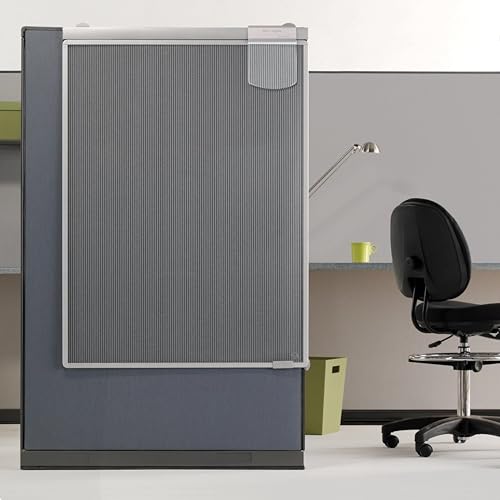
Designed with adaptability in mind, the Quartet Workstation Privacy Screen (36″ x 48″) is perfect for professionals seeking to create focused work environments in cubicles or open offices. Its adjustable height and sliding features allow you to customize your space effortlessly. This privacy screen minimizes distractions, transforming your workspace into an interruption-free zone to enhance productivity. The translucent design blocks large distractions while letting in natural light, adding a modern touch to your office. Built with a shatterproof polycarbonate surface and sturdy aluminum frame, it promises durability, making it an ideal choice for busy environments. Plus, it includes an attachable whiteboard!
Best For: Professionals seeking to enhance focus and minimize distractions in cubicles or open office environments.
Pros:
- Adjustable height and sliding features for optimal customization of workspace.
- Translucent design allows natural light while blocking large distractions.
- Durable construction with shatterproof polycarbonate and sturdy aluminum frame.
Cons:
- May not provide complete privacy in very open office layouts.
- Limited size (36″ x 48″) might not suit all workspace configurations.
- The attachable whiteboard may require additional maintenance or cleaning.
DUMOS Small Portable Rolling Laptop Table on Wheels

For those who need a versatile workspace that adapts to your changing needs, the DUMOS Small Portable Rolling Laptop Table on Wheels stands out as an ideal choice. This mobile desk features an adjustable height, ranging from 28.54 to 42.52 inches, allowing you to switch easily between sitting and standing. Its four silent wheels enable smooth movement, while two lockable wheels guarantee stability when you need it. Crafted from durable MDF, it’s easy to clean, and the sturdy metal H-shaped base supports up to 33 lbs. Setup is a breeze, and customer support is just an email away for any questions.
Best For: Individuals seeking a flexible and mobile workstation for home or office use, especially those who alternate between sitting and standing while working.
Pros:
- Adjustable Height: Easily switch between sitting and standing modes with a height range of 28.54 to 42.52 inches.
- Mobility: Features four silent wheels for effortless movement and two lockable wheels for added stability.
- Durable Design: Constructed from easy-to-clean MDF and a sturdy metal H-shaped base, supporting up to 33 lbs.
Cons:
- Weight Limit: Limited to a maximum weight capacity of 33 lbs, which may not accommodate heavier equipment.
- Compact Size: The 19-inch desktop may be too small for users with multiple monitors or extensive workspace needs.
- Assembly Required: Some users may find the setup process challenging despite provided instructions.
OffiGo 63 Inch Reversible L Shaped Electric Standing Desk

The OffiGo 63 Inch Reversible L Shaped Electric Standing Desk is perfect for those who crave flexibility in their workspace. With an adjustable height ranging from 27.9 to 46.1 inches, you can easily switch between sitting and standing. Its spacious design accommodates multiple monitors and laptops, making it ideal for both home offices and gaming setups. The reversible design allows you to orient the sub-desktop to fit your room layout perfectly. Constructed from engineered wood and alloy steel, it offers stability and durability. Plus, assembly is straightforward, with detailed instructions and a helpful video available.
Best For: Those seeking a versatile and adjustable workspace for home offices or gaming setups that accommodates multiple devices.
Pros:
- Spacious design allows for multiple laptops and monitors, enhancing productivity.
- Reversible design enables customization of the desk layout to fit different room configurations.
- Sturdy construction with reinforced legs ensures stability during height adjustments.
Cons:
- Weight of 72.8 pounds may make it difficult to move or relocate without assistance.
- Requires assembly, which could be time-consuming for some users.
- Limited color options, as it is only available in black.
71″ Executive L Shaped Desk with Drawers & Storage

An ideal choice for professionals seeking both style and functionality, the 71″ Executive L Shaped Desk offers ample storage with its three drawers and open shelves. You’ll appreciate the spacious working area of 71” x 55.1”, providing comfort for your legroom while accommodating printers and scanners. Plus, its built-in charging station with four outlets and two USB ports lets you power up to six devices simultaneously. The sturdy metal frame guarantees stability, while the textured, waterproof desktop stands up to everyday use. Assembly is a breeze, with detailed instructions and customer support available within 24 hours.
Best For: Professionals seeking a stylish and functional workspace that accommodates various office needs.
Pros:
- Ample storage space with three drawers and open shelves for organization.
- Built-in charging station supports multiple devices, enhancing productivity.
- Sturdy construction with a waterproof and wear-resistant desktop for durability.
Cons:
- L-shaped design may require a larger room for optimal placement.
- Assembly may take time, especially for those unfamiliar with furniture assembly.
- Limited color options may not suit all aesthetic preferences.
Factors to Consider When Choosing Office Workstations
When choosing office workstations, you need to reflect on several key factors. Ergonomic design, space optimization, and storage solutions all play a vital role in creating a productive environment. Don’t forget to take into account height adjustments and your power connectivity needs as well.
Ergonomic Design Importance
Choosing the right office workstation is essential for your long-term health and productivity, especially considering how many hours you spend at your desk. An ergonomic design promotes better posture, greatly reducing the risk of back and waist pain while enhancing comfort during long hours. Look for adjustable height features, like standing desks, which let you alternate between sitting and standing to boost energy and productivity. A well-designed workstation accommodates different body types, helping you maintain a neutral position and minimizing strain on muscles and joints. Incorporating dual monitor setups and removable keyboard trays can improve workspace efficiency and reduce repetitive strain injuries. Ultimately, a properly designed workstation enhances focus, creating an environment that fosters productivity and well-being.
Space and Layout Optimization
Effective space and layout optimization is essential for creating a functional and inviting office environment. Start by considering the dimensions of your available space; choose workstations that fit comfortably without blocking movement. Modular and scalable systems, like cubicle workstations, can adapt to both individual and collaborative needs, enhancing flexibility. Opt for desks with adjustable height features to accommodate various working positions, promoting ergonomics even in tight areas. Efficient cable management designs help maintain a tidy workspace, reducing clutter that disrupts your layout. Additionally, strategically placing workstations can minimize distractions and maximize natural light exposure, boosting productivity. By focusing on these factors, you’ll create an efficient office space that supports both comfort and collaboration.
Storage and Organization Features
While prioritizing comfort and collaboration in office workstations, it’s essential not to overlook the importance of storage and organization features. Effective storage, like drawers and shelves, keeps your workstation tidy and efficient. Look for workstations with dedicated compartments for accessories and files, as these can minimize clutter and make essentials easily accessible. Integrated power hubs or charging stations are a must, allowing you to conveniently charge devices without the hassle of extra cords. Additionally, adjustable partitions or privacy screens can create personalized spaces, helping you focus in shared environments. A well-organized workstation improves ergonomics by keeping tools within reach, promoting comfort, and reducing strain during your workday.
Height Adjustment Options
When considering height adjustment options for office workstations, it’s crucial to prioritize your comfort and well-being. Look for desks that adjust between 4.9 inches and 46.1 inches, allowing you to alternate between sitting and standing. Many height-adjustable desks use pneumatic lift systems or electric motors, providing smooth shifts. These ergonomic designs can help alleviate back and waist pain by encouraging better posture throughout your workday. If you share your workspace, consider models with customizable height presets for quick adjustments. Additionally, dual-layer designs with separate keyboard trays that adjust in sync with the main desk surface guarantee a consistent ergonomic setup, making your work environment more comfortable and productive.
Power and Connectivity Needs
As you choose office workstations, it’s essential to take into account your power and connectivity needs to guarantee a productive environment. Start by checking the number of power outlets available; built-in charging stations can support multiple devices, boosting your productivity. Look for workstations with USB ports for easy device charging without extra adapters. Evaluate cable management solutions to keep your workspace organized and clutter-free, enhancing your focus. Verify the workstation can accommodate power hubs or charging strips for quick access to power sources for laptops and monitors. Finally, consider designs with integrated power management systems, which streamline your workflow by reducing cord clutter and ensuring seamless connectivity throughout your workday.