The best battery-powered smart locks make it easier to enter, secure, and monitor your home without relying on a traditional key. The options in this roundup range from simple keypad deadbolts to connected models with fingerprint access, Wi-Fi control, cameras, and app-based alerts.
Use the buying guide below to compare power needs, unlocking methods, connectivity, installation requirements, and the features that matter most for your door and daily routine.
Best 10 Battery Powered Smart Locks Picks for 2026
Most Feature-Packed
myQ Secure View 3-in-1 Smart Lock
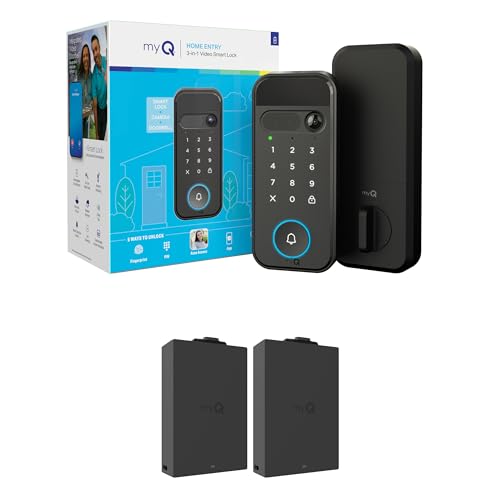
- Combines lock, doorbell, and 2K HDR camera
- Five entry methods, including face and fingerprint
- Remote app control with night vision and two-way audio
Best For: Integrated entry and visitor monitoring
Best Budget Keypad Option

- Up to one year from four AA batteries
- 20 codes plus one-time passwords and spare keys
- Auto-lock, weather resistance, and DIY installation
Best For: Simple keypad entry without app connectivity
Best for Eufy Homes

- Up to eight months from eight AA batteries
- Six unlocking methods with built-in Wi-Fi
- Works with eufy routines and supports notifications
Best For: Connected eufy households and flexible remote access
Best Emergency Backup

- Fast fingerprint entry with AI-learning scanner
- Up to eight months of power from eight AA batteries
- USB-C port can provide emergency power from a power bank
Best For: Fingerprint access with depleted-battery protection
Best Value Keypad Lock

- Up to 20 user codes plus one-time guest PINs
- Up to 365 days of AA battery life
- Simple installation with backup keys
Best For: Keypad entry without app or Wi-Fi features
Best Connected Fingerprint Lock
Tapo DL110 Smart Wi-Fi Deadbolt

- Six access methods, including fingerprint and Wi-Fi
- Stores up to 100 fingerprints
- Rechargeable battery lasts up to one year
Best For: Connected homes seeking biometric and remote access
Best Smart Handle Lock

- Supports up to 100 codes and app-managed access
- Adjustable latch fits common door backsets
- Gateway enables remote and voice control
Best For: Homes and rentals needing a keypad handle
Best Wi-Fi Keypad Pick

- Multiple keypad, app, Bluetooth, voice, and key entry options
- Up to 200 codes plus activity alerts and auto-lock
- Up to 300 days in Bluetooth mode; four AA batteries included
Best For: Families wanting flexible access and smart-home integration
Best Fingerprint Option
Wi-Fi Fingerprint Keypad Deadbolt
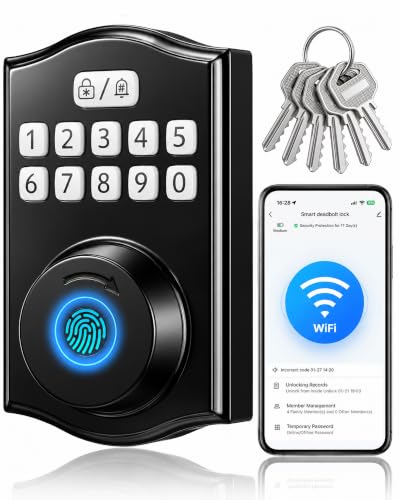
- Stores 100 fingerprints and 100 individual user codes
- Smart Life app offers history, alerts, and remote unlocking
- Includes six backup keys and USB-C emergency power
Best For: Homes, rentals, and offices needing biometric access
Best Long-Life Remote Lock
Wireless Remote-Control Deadbolt

- Four remote controls plus key access are included
- Four AA batteries are rated for about one year
- Automatically locks three seconds after closing
Best For: Doors needing simple remote entry without Wi-Fi or app setup
Most Feature-Packed – myQ Secure View 3-in-1 Smart Lock
Among battery powered smart locks, the myQ Secure View stands out by combining a deadbolt, video doorbell, and 2K HDR camera in one unit. It supports face, fingerprint, PIN, app, and key entry, while the myQ app provides remote control, visitor viewing, and alerts.
Best For: Homeowners who want an integrated smart lock and doorbell camera with multiple entry methods.
Pros:
- Combines a smart deadbolt, doorbell, and 2K HDR camera.
- Offers five entry methods, including face and fingerprint access.
- Provides color night vision, two-way audio, and app-based remote control.
Cons:
- Face and fingerprint recognition is unavailable in Illinois, Texas, and outside the U.S. and Canada.
- Its 5.5-pound, multi-function design may be more than needed for shoppers seeking a basic lock.
This is a strong all-in-one choice when visitor monitoring matters as much as keyless entry. Buyers should verify regional availability of biometric features before purchasing.
Best Budget Keypad Option – Veise RZ-A Keypad Deadbolt
The Veise RZ-A is a straightforward option among battery powered smart locks, using four AA batteries for up to a year of daily use. Its keypad supports permanent and one-time codes, while auto-lock, anti-peeping input, and physical backup keys add everyday convenience.
Best For: Shoppers who want keypad access, long stated battery life, and simple DIY installation without app connectivity.
Pros:
- Supports 20 permanent codes, one-time passwords, and two spare keys.
- Offers adjustable auto-lock timing from 10 to 99 seconds.
- Includes low-battery alerts, vacation mode, silent mode, and IP54 weather resistance.
- Designed for DIY installation with a screwdriver and fits many standard U.S. doors.
Cons:
- Four AA batteries are not included.
- It does not provide app-based remote control or fingerprint entry.
- The door handle is not included.
The RZ-A focuses on practical keypad access rather than connected features. It suits front, back, side, bedroom, garage, or utility doors where local code entry is the priority.
Best for Eufy Homes – eufy Security Smart Lock C220
The eufy Security Smart Lock C220 is a versatile choice among battery powered smart locks, offering up to eight months of operation from eight AA batteries. Built-in Wi-Fi enables remote app control without a bridge, and users can unlock with a fingerprint, keypad, physical key, app, Apple Watch, or compatible voice assistant.
Best For: Eufy users who want built-in Wi-Fi, biometric entry, and multiple ways to manage a compatible deadbolt remotely.
Pros:
- Provides six unlocking methods, including fingerprint and Apple Watch access.
- Built-in Wi-Fi supports remote control, notifications, and event history without a bridge.
- Self-learning fingerprint recognition is designed to improve with use.
- Offers IP53 protection, alarm notifications, and compatibility with most standard U.S. and Canadian deadbolts.
Cons:
- Battery life is rated at up to eight months and may vary with usage.
- Its ecosystem integrations may be most useful to existing eufy users.
The C220 balances broad access options with connected controls and a relatively simple installation. It is particularly compelling when you already use eufy devices or want remote management without buying a separate bridge.
Best Emergency Backup – WYZE Auto-Lock Bolt v2
The WYZE Auto-Lock Bolt v2 combines fingerprint, keypad, app, and physical-key entry in a battery powered smart lock with built-in Wi-Fi. It includes eight AA batteries rated for up to eight months and adds a USB-C emergency power option, allowing a power bank to provide temporary power if the batteries run out.
Best For: Homeowners who want fingerprint entry, remote app control, and a practical way to handle depleted batteries.
Pros:
- Fingerprint scanner can unlock the door in about 0.5 seconds.
- AI-learning recognition is designed to improve accuracy over time.
- Includes up to eight months of battery life plus USB-C emergency power.
- Supports app, keypad, fingerprint, and physical-key entry.
Cons:
- Battery life varies with use and is rated for up to eight months.
- Video-doorbell unlocking requires pairing with a Wyze Video Doorbell.
- Voice control is listed, but the supplied notes do not specify supported voice assistants.
The Bolt v2 is a well-rounded pick for users who value fast biometric access and a backup plan for dead batteries. Its Wyze doorbell integration is an added benefit for shoppers already using that ecosystem.
Best Value Keypad Lock – TEEHO TE001 Keypad Deadbolt
For shoppers comparing battery powered smart locks, the TEEHO TE001 is a straightforward keypad deadbolt with no connectivity requirement. It supports up to 20 user codes, a one-time guest PIN, automatic locking, and backup keys, making it practical for front doors, back doors, rentals, and garages.
Best For: Families and renters who want keyless entry without app or Wi-Fi features.
Pros:
- Stores up to 20 access codes and supports one-time guest codes.
- Battery life is rated for up to 365 days, with a low-battery indicator.
- Automatic locking, one-touch locking, anti-peeping protection, and IP54 weather resistance.
- Installs with a screwdriver and includes two backup keys.
Cons:
- Four AA batteries are required but not included.
- It has no app, Wi-Fi, or Bluetooth connectivity.
- It fits 2-1/8-inch door holes and is not compatible with 38mm holes.
The TE001 focuses on dependable keypad access rather than connected smart-home control. Check the door dimensions carefully, and reset the lock before first use so it can detect the door handing correctly.
Best Connected Fingerprint Lock – Tapo DL110 Smart Wi-Fi Deadbolt
The Tapo DL110 stands out among battery powered smart locks for its broad access flexibility. Fingerprint recognition, passcodes, Wi-Fi and Bluetooth control, voice-assistant compatibility, and backup keys give households several ways to unlock and manage the door.
Best For: Connected homes that want fingerprint access, remote management, and multiple entry methods.
Pros:
- Offers six access methods, including fingerprints, passcodes, Wi-Fi, Bluetooth, voice control, and keys.
- Stores up to 100 fingerprints and recognizes them in about 0.42 seconds.
- Includes scheduled and one-time guest codes with in-app access management.
- Uses a removable rechargeable battery rated for up to one year and charges through USB-C.
Cons:
- Its connected features depend on app, Wi-Fi, or Bluetooth setup.
- It is a more feature-rich option than a basic keypad deadbolt.
- The supplied specifications list a 2.09 kg product weight, which may matter for installation planning.
Choose the DL110 if biometric entry and remote access are priorities. Its rechargeable battery reduces disposable-battery maintenance, while the included keys provide a conventional fallback.
Best Smart Handle Lock – TEEHO TE019 Keypad Door Lock
For buyers seeking battery powered smart locks with an integrated handle, the TEEHO TE019 combines keypad entry, app-based code management, and a traditional key backup. Its adjustable latch and broad code capacity make it a flexible choice for homes, apartments, offices, and rental properties.
Best For: Families, landlords, and renters who want a keypad handle with optional app and gateway features.
Pros:
- Supports the KK Home App, up to 100 passcodes, and two backup keys.
- Creates one-time, timed, permanent, and recurring codes, with activity tracking in the app.
- Offers adjustable auto-lock timing, one-touch locking, anti-peeping protection, and IP55 weather resistance.
- Fits 2-3/8- or 2-3/4-inch backsets and installs with a screwdriver.
Cons:
- Four AA batteries are required but not included.
- Remote control, voice assistants, and broader smart-home integration require the separately sold TEEHO G1 Gateway.
- App-based features require Bluetooth or the applicable gateway setup.
The TE019 is a practical match for doors that need both a lever handle and flexible code management. Its gateway requirement is the key consideration if remote operation or Alexa and Google Assistant support is important.
Best Wi-Fi Keypad Pick – Tapo DL100 Smart Deadbolt
The Tapo DL100 is a versatile choice among battery powered smart locks, combining keypad, Bluetooth, Wi-Fi, app, and voice access. Its backlit tactile buttons, remote controls, customizable codes, and included batteries make it practical for everyday front-door use.
Best For: Families and homeowners who want flexible access methods, remote monitoring, and broad smart-home compatibility.
Pros:
- Offers keypad, Bluetooth, Wi-Fi, app, voice, and backup-key entry.
- Supports up to 200 customizable access codes with anti-peeping password entry.
- Runs up to 200 days in Wi-Fi mode or 300 days in Bluetooth mode on four included AA batteries.
- Works with Alexa, Google Home, and Samsung SmartThings.
Cons:
- Battery life is shorter when using Wi-Fi mode.
- Remote and voice unlocking depend on connected app or smart-home features.
With real-time alerts, activity history, auto-lock, USB-C emergency power, and IP54 weather resistance, the DL100 offers a well-rounded balance of convenience and security. Its BHMA Grade 3 certification and standard-hole installation further support it as a practical upgrade.
Best Fingerprint Option – Wi-Fi Fingerprint Keypad Deadbolt
This Wi-Fi fingerprint deadbolt stands out among battery powered smart locks for combining biometric entry with individual PINs and app control. It can store up to 100 fingerprints and 100 user codes, giving households, rentals, and small offices flexible credential management.
Best For: Users who prefer fingerprint access and need multiple personal codes with remote management over 2.4 GHz Wi-Fi.
Pros:
- Stores up to 100 fingerprints and 100 individual user codes.
- Smart Life app supports user management, access history, alerts, and remote unlocking.
- Includes anti-peep password entry, adjustable auto-lock, six backup keys, and USB-C emergency power.
- Fits left- or right-handed doors with several listed door and backset dimensions.
Cons:
- Wi-Fi setup requires a 2.4 GHz network.
- The supplied notes do not specify expected battery life.
- Fingerprint entry adds biometric functionality but may be more capability than some basic users need.
The Y78-V is a strong fit when fast biometric entry and detailed credential control matter more than simplicity. Its adjustable auto-lock and emergency access options help reduce lockout concerns, while the three-year manufacturer warranty adds useful support.
Best Long-Life Remote Lock – Wireless Remote-Control Deadbolt
This electronic deadbolt takes a simpler approach to battery powered smart locks, using remote controls rather than Wi-Fi or an app. Four AA batteries are rated for about one year of operation, and the lock automatically relocks three seconds after closing, making it suited to straightforward remote entry.
Best For: Homes, offices, garages, hotels, and other doors where remote-control access and long stated battery life are priorities.
Pros:
- Includes four remote controls and supports key unlocking as a backup.
- Four AA batteries are stated to provide about one year of operation.
- Automatic locking occurs three seconds after the door closes.
- Stainless-steel locking parts and an anti-rust battery box are designed for durability.
Cons:
- Four AA batteries are not included.
- Remote range is limited to 0–10 meters.
- Does not offer the keypad, app, Wi-Fi, or activity-history features found on more connected locks.
The remote-control system is a good choice for buyers who want uncomplicated access without wiring or network setup. Its approximately one-year battery estimate is appealing, but the limited range and lack of connected controls make it less suitable for remote monitoring or smart-home automation.
How We Picked the Best Battery Powered Smart Locks
We selected these Battery Powered Smart Locks to cover a wide range of budgets, entry methods, connectivity options, and installation styles. The lineup includes keypad-only models for straightforward keyless access, fingerprint locks for faster entry, Wi-Fi-enabled deadbolts for remote control, and options with additional features such as cameras, handles, or remote controls.
We also considered practical ownership factors: compatibility with common deadbolt preparations, battery accessibility, backup entry options, app functionality, weather exposure, and suitability for homes, rentals, families, and short-term guests. A smart lock should improve convenience without creating a new access or maintenance problem.
Quick Comparison
| Lock type | Best for | Entry methods | Connectivity |
|---|---|---|---|
| Keypad deadbolt | Simple keyless entry | PIN, physical key | None or limited |
| Fingerprint smart lock | Fast everyday access | Fingerprint, PIN, app, key | Bluetooth or Wi-Fi |
| Wi-Fi smart lock | Remote access and alerts | App, PIN, fingerprint, key | Wi-Fi |
| Lock with handle | Complete entry hardware | PIN, key, app, or fingerprint | Varies by model |
| Camera-equipped lock | Entry monitoring | Multiple methods plus video | Wi-Fi |
Key Buying Factors for Battery-Powered Smart Locks
Battery Life and Backup Access
Check the expected battery type, replacement process, low-battery warnings, and emergency power feature. A USB power port, mechanical keyway, or external backup option can prevent lockouts when batteries run down.
Installation and Door Compatibility
Confirm that the lock fits your door thickness, backset, borehole, and existing deadbolt or handle configuration. Some models replace only the deadbolt, while others require a complete handle or latch installation. Measure before ordering.
Unlocking Options
PIN codes are convenient for family members and guests, while fingerprint readers can provide quicker personal access. App control is useful for remote unlocking and activity notifications, but a physical key or another offline method is valuable during connectivity problems.
Wi-Fi, Bluetooth, and Smart-Home Support
Wi-Fi models can offer remote control, temporary codes, and real-time alerts without being nearby. Bluetooth-focused locks may use less power but usually require proximity or an additional hub for remote access. Check compatibility with your preferred voice assistant or smart-home platform.
Security and Privacy
Look for automatic locking controls, tamper alerts, encrypted communication, user permissions, and a reliable manual override. For fingerprint or camera-equipped models, review how biometric data and video are stored and managed.
Who Should Buy Which Battery Powered Smart Locks?
- Choose a basic keypad deadbolt if you want affordable keyless entry with minimal setup and do not need remote access.
- Choose a fingerprint model if fast, hands-free entry is your priority and several household members need convenient access.
- Choose a Wi-Fi lock if you want remote unlocking, temporary guest codes, activity logs, or phone alerts while away.
- Choose a lock with a handle if you are replacing both the deadbolt and lever or want coordinated front-door hardware.
- Choose a camera-equipped option if seeing visitors and recording activity is more important than having the simplest installation.
Before buying, verify your door measurements, decide which access methods you will actually use, and choose a model with a dependable battery warning and backup entry plan. Those details matter more than adding features you may rarely need.