The best video doorbells for elderly users make it easier to see visitors, answer the door, and monitor activity without rushing to the entryway. A built-in indoor monitor, clear two-way audio, and simple controls can be especially helpful for older adults.
This roundup compares 10 wireless doorbell systems across video quality, viewing screens, connectivity, subscription requirements, motion detection, and installation convenience.
Best 10 Video Doorbells for Elderly Picks for 2026
Best Overall for Easy At-Home Monitoring
1080P Doorbell with 7-Inch Monitor

- Large 7-inch indoor touchscreen
- Local 32GB storage with no subscription
- Remote app access and two-way audio
Best For: Older adults who prefer a large indoor display
Best for High-Detail Video

- Retinal 2K video with up to 6x zoom
- Real-time alerts and two-way talk
- Works with select Alexa devices
Best For: Families prioritizing detailed footage and app monitoring
Best Compact Monitor System
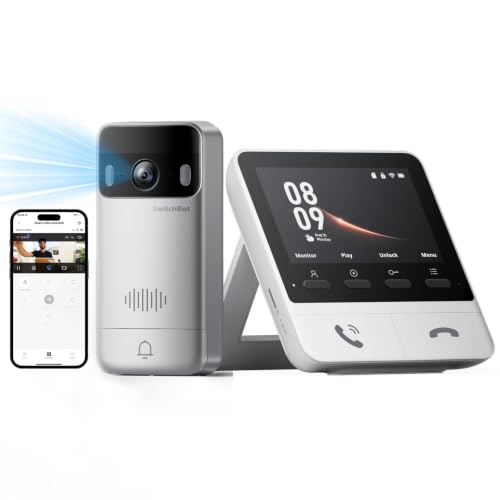
- 4.3-inch indoor color monitor
- 2K video with color night vision
- Local storage without a required subscription
Best For: Apartments and short-distance indoor monitor setups
Simple Offline Pick
FunnyPanda 4.5-Inch Monitor Doorbell

- Dedicated 4.5-inch monitor with 720P video
- No Wi-Fi, app, or subscription required
- Two-way audio with night vision and local recording
Best For: Seniors who prefer a simple offline doorbell with a dedicated screen
Wide-View Value
TKMARS 4.3-Inch Video Doorbell

- 170° view on a dedicated 4.3-inch monitor
- Works without Wi-Fi, an app, or subscription
- Includes push-to-talk audio and LED illumination
Best For: Seniors seeking broad entrance coverage without smartphone dependence
Large-Screen Upgrade
7-Inch Touchscreen Video Doorbell

- 7-inch 1080P touchscreen is easy to view
- 160° lens with motion detection and night vision
- Local TF-card storage with optional smartphone app
Best For: Seniors who want a larger display and optional family phone access
No-Internet Simplicity

- Dedicated 4.3-inch indoor monitor
- No Wi-Fi, app, or monthly fees
- Active wake-up and local recording
Best For: Seniors wanting simple monitor-based operation
High-Resolution Coverage

- 2K video with head-to-toe viewing
- 4.3-inch color monitor with playback
- Motion alerts and included 4GB SD card
Best For: Users wanting clearer video and more monitoring features
Simple Elder-Friendly Setup

- 1080p video on a 4.3-inch screen
- No app, Wi-Fi, or subscription
- 170-degree view and two-way audio
Best For: Elderly users wanting basic plug-in monitor operation
Best Overall for Easy At-Home Monitoring – 1080P Doorbell with 7-Inch Monitor
For families comparing video doorbells for elderly relatives, this wireless system stands out for its large indoor touchscreen, local recording, and operation without a required subscription. The included monitor lets users view and answer visitors from inside, while app access helps family members check in remotely.
Best For: Older adults who prefer a large, tablet-like indoor screen and families wanting remote access with local storage.
Pros:
- Includes a 7-inch touchscreen monitor with integrated controls.
- 1080P video, a 160-degree viewing angle, and automatic infrared night vision.
- Includes a 32GB memory card with no subscription or monthly storage charge.
- Supports motion alerts, two-way audio, and TuyaSmart app access.
Cons:
- The monitor battery is rated for approximately 5–8 hours per charge.
- Wireless performance can vary with walls and the surrounding environment.
- The manufacturer advises against installing the outdoor unit on a metal door.
This is a practical choice when simplicity inside the home matters most. The large screen and local recordings reduce reliance on a smartphone, while the 7000mAh outdoor battery is designed to last roughly 45–60 days depending on usage.
Best for High-Detail Video – Ring Battery Doorbell 2K
Among video doorbells for elderly users, this Ring model is a good fit for households that prioritize sharp footage and the ability to inspect distant details. Its Retinal 2K video, up to 6x enhanced zoom, phone alerts, and two-way talk support straightforward remote monitoring.
Best For: Families who want detailed video, phone notifications, and compatibility with Alexa-enabled devices.
Pros:
- Retinal 2K video provides crisp views of the entrance.
- Up to 6x enhanced zoom helps inspect faces and distant details.
- Supports Live View, two-way talk, and real-time motion notifications.
- The built-in battery detaches for USB-C recharging.
Cons:
- The USB-C charging cable is not included.
- AI alerts and viewing recorded history require a compatible Ring Protect subscription sold separately.
- It does not include a dedicated indoor monitor.
This model is strongest for caregivers who expect to use a phone or Alexa device rather than an indoor touchscreen. Keep the optional subscription in mind if reviewing missed events and AI-powered alerts is important.
Best Compact Monitor System – SwitchBot 2K Doorbell Camera
This SwitchBot system is worth considering for video doorbells for elderly residents who benefit from seeing visitors on an indoor screen instead of opening a phone app. It combines a 4.3-inch monitor with 2K video, color night vision, local storage, and optional integration with SwitchBot locks.
Best For: Smaller apartments or short-to-medium-distance setups where an always-powered indoor monitor is convenient.
Pros:
- 4.3-inch color monitor provides direct visitor viewing and two-way communication.
- 2K resolution, a 165-degree viewing angle, and color night vision cover the entrance clearly.
- Includes a 4GB SD card and supports microSD cards up to 512GB without requiring a subscription.
- Supports additional monitors, Alexa, and compatible SwitchBot Smart Locks.
Cons:
- The indoor monitor requires a power connection.
- The recommended monitor-to-doorbell distance is no more than 5 meters; walls and metal doors may affect performance.
- Additional monitors and the solar panel are sold separately.
The compact screen and quick replies make this a useful retrofit for an apartment or nearby entryway. It is less suitable for homes where the monitor must sit far from the door unless an additional monitor is added.
Best Large-Screen Value – Wireless 1080p Doorbell with Touchscreen
For shoppers seeking video doorbells for elderly family members, this wireless package offers a large 7-inch touchscreen, pre-paired setup, and local storage without recurring fees. The monitor and Tuya app can both show visitors, while motion detection and night vision provide ongoing entryway coverage.
Best For: Seniors who want a simple indoor display and households without existing doorbell wiring.
Pros:
- 7-inch 1080p touchscreen makes visitor viewing easier indoors.
- Camera and monitor arrive pre-paired, with no wiring required.
- Includes 32GB local storage and supports cards up to 128GB without a subscription.
- Offers Tuya app remote access, two-way audio, adjustable PIR detection, and IP65 weather resistance.
Cons:
- The dedicated wireless link uses 2.4GHz connectivity.
- Night vision is specified for a range of up to 3 meters.
- Remote unlocking depends on a compatible door-lock setup.
This is a straightforward, senior-friendly package when a bigger screen and no monthly storage cost are priorities. Its pre-paired connection simplifies installation, though buyers should verify that the stated wireless range suits their entryway.
Simple Offline Pick – FunnyPanda 4.5-Inch Monitor Doorbell
For shoppers comparing video doorbells for elderly users, the FunnyPanda emphasizes straightforward operation without Wi-Fi, an app, or a subscription. Its dedicated 4.5-inch indoor monitor shows visitors at the door and supports two-way communication.
Best For: Seniors who want a dedicated screen and a simple, offline doorbell system.
Pros:
- 4.5-inch IPS display with 720P video and a 120° viewing angle.
- No home Wi-Fi, smartphone, app, or monthly subscription required.
- Two-way audio, infrared night vision, and IP54 outdoor protection.
- Supports local recording with a TF card up to 128GB; card not included.
Cons:
- The monitor should remain connected to charging power for dependable daily use.
- The indoor screen is smaller and lower resolution than some larger-monitor options.
- Wireless range can be reduced by walls, metal doors, and interference.
This is a practical choice when ease of use and independence from internet services matter most. The adjustable volume, brightness, and ringtone settings add useful flexibility for different rooms and preferences.
Wide-View Value – TKMARS 4.3-Inch Video Doorbell
The TKMARS is a user-friendly option among video doorbells for elderly households, pairing a dedicated indoor monitor with a push-to-talk intercom. It works without home Wi-Fi, an app, or subscription fees, making visitor checks less dependent on a smartphone.
Best For: Seniors who want a wide-angle view, simple talk controls, and no internet setup.
Pros:
- 4.3-inch IPS monitor displays visitors when the doorbell is pressed.
- 170° viewing angle provides a broad view of the entrance.
- Push-to-talk audio supports speaking and listening from indoors.
- IP65 protection, LED illumination, and a rechargeable 1,000mAh battery.
Cons:
- Two-way conversation uses a press-and-hold, turn-taking control.
- Video recording requires an 8–32GB FAT32 TF card.
- Walls, metal doors, and interference can reduce the wireless range.
Its broad field of view and dedicated display make it well suited to routine visitor identification. Buyers should test the wireless connection before permanently mounting the outdoor unit.
Large-Screen Upgrade – 7-Inch Touchscreen Video Doorbell
For those seeking video doorbells for elderly users with a larger interface, this system combines a 7-inch 1080P touchscreen with a wireless outdoor camera. It can be operated from the monitor, while optional app support adds remote access for compatible smartphone users.
Best For: Seniors who benefit from a large display and families who want optional phone notifications.
Pros:
- Large 7-inch touchscreen with 1080P video.
- Monitor supports answering calls, monitoring, and unlocking functions.
- 160° wide-angle lens, motion detection, night vision, and two-way audio.
- Local storage on the included TF card without subscription fees.
Cons:
- App features require a compatible smartphone and wireless network setup.
- Motion detection triggers alerts for movement within approximately 5 meters, which may require adjustment to the installation location.
- The claimed wireless distance can vary with walls and other obstacles.
The large touchscreen is the standout feature for users who find smaller displays difficult to read. It offers more functionality than a basic offline monitor, but its app and network features may require more setup than simpler systems.
No-Internet Simplicity – TKMARS Monitor Doorbell
For shoppers comparing video doorbells for elderly users, the TKMARS system keeps things straightforward with a dedicated 4.3-inch monitor and no Wi-Fi, app, cloud account, or monthly fee. Its active wake-up feature lets you check the entrance before someone rings, while push-to-talk communication supports basic visitor conversations from indoors.
Best For: Seniors who prefer a dedicated screen and a doorbell system that does not require internet access or smartphone use.
Pros:
- No Wi-Fi, app, router, cloud account, or subscription required.
- Active wake-up allows users to check outside before a ring.
- 4.3-inch screen, 170-degree viewing angle, and night vision support entrance monitoring.
- Doorbell-triggered local recording works with a compatible 8–32GB microSD card.
Cons:
- The monitor needs to remain connected to 5V/1A USB-C power for daily use.
- Two-way communication is push-to-talk rather than fully hands-free.
- Motion detection and automatic photo capture are not supported.
This is a practical choice for a simple, self-contained setup. The dedicated monitor and active wake-up function are particularly useful, though buyers should plan for monitor power and purchase a compatible memory card separately if recording is desired.
High-Resolution Coverage – SwitchBot Video Doorbell
The SwitchBot combines a 4.3-inch color monitor with 2K video, motion alerts, and local storage, making it a more feature-rich option among video doorbells for elderly users. It can operate without internet access for core monitoring, while its integrated Wi-Fi repeater is designed to help maintain the connection between the doorbell and monitor.
Best For: Older adults or caregivers who want a larger feature set, clearer video, motion notifications, and a dedicated indoor display.
Pros:
- 2K resolution, 165-degree view, and head-to-toe 16:9 coverage.
- 4.3-inch color monitor supports live viewing, playback, calls, and quick responses.
- Motion alerts, color night vision, and tamper detection add monitoring features.
- Includes a 4GB SD card and supports local storage without a required subscription.
Cons:
- The indoor monitor requires a power cable.
- The doorbell and monitor should be within about 5 meters for a strong, immediate connection.
- Optional cloud storage is available only with a limited free trial for new customers.
SwitchBot is the strongest fit here for users who value image quality and motion awareness over the simplest possible setup. The screen and quick-response controls may be convenient for deliveries, but installation should account for monitor placement and power.
Simple Elder-Friendly Setup – Winnes Doorbell Camera
The Winnes wireless doorbell uses a dedicated 4.3-inch screen and Bluetooth connection, so it avoids apps, Wi-Fi, subscriptions, and network setup. For people evaluating video doorbells for elderly users, its one-click pairing, two-way audio, wide view, and straightforward indoor display make the system easy to understand.
Best For: Elderly users who want a basic screen-based doorbell with rechargeable outdoor hardware and no app or internet connection.
Pros:
- No app, Wi-Fi, network connection, or subscription is required.
- 4.3-inch screen, 1080p video, and 170-degree viewing angle help identify visitors.
- Two-way talk supports conversations without opening the door.
- IP65 outdoor protection and a rechargeable 1000mAh doorbell battery support outdoor use.
Cons:
- The display must remain connected to power because its built-in battery is only 400mAh.
- The camera cannot be viewed unless someone presses the doorbell.
- Recording requires an SD card, which is not stated as included.
Winnes offers an uncomplicated, no-network approach with useful wide-angle video and two-way conversation. It is best for households comfortable keeping the indoor screen plugged in and accepting that the camera is not available for on-demand viewing.
How We Picked the Best Video Doorbells for Elderly Users
We focused on features that support comfortable, dependable everyday use: an indoor display that is easy to view, straightforward visitor communication, useful night vision, wide-angle coverage, wireless installation, and reliable motion alerts. We also included both no-subscription systems with local monitors and app-connected models for families who want remote access.
Because needs vary, the list includes options with 720p and 1080p video, higher-resolution 2K cameras, different screen sizes, and systems that work with or without home Wi-Fi. Product claims should still be checked carefully for battery life, storage compatibility, weather resistance, and included accessories before purchase.
Quick Comparison
- Best for a large, easy-to-read display: Choose a system with a 7-inch touchscreen monitor.
- Best for sharper visitor details: Consider a 2K model, particularly when identifying faces or packages matters.
- Best without internet service: Look at monitor-based TKMARS or similar no-Wi-Fi systems.
- Best for remote family monitoring: An app-enabled model, such as a Ring or SwitchBot option, may provide access away from home.
- Best for avoiding recurring costs: Prioritize products that clearly support local viewing and storage without a subscription.
Key Buying Factors for Video Doorbells for Elderly
Screen Size and Simplicity
A 7-inch monitor is generally easier to see than a small phone screen, especially for users with limited vision. Touch controls should be clearly labeled, while physical buttons can be preferable for answering calls or adjusting volume quickly.
Audio and Visitor Communication
Look for two-way talk with loud, intelligible sound. Adjustable volume, low-latency communication, and hands-free answering can make conversations less frustrating. A chime that can be heard throughout the home is also important.
Video Coverage and Night Viewing
Wide-angle lenses reduce blind spots around the doorway, while night vision helps identify visitors after dark. Higher resolution can improve detail, but a clear display and dependable lighting performance may matter more than resolution alone.
Installation, Power, and Connectivity
Battery-powered models simplify installation but require charging. Check expected battery life and whether the battery is removable. Wi-Fi models can support remote alerts but depend on a stable network; no-Wi-Fi monitor systems may be easier for households that want fewer setup steps.
Privacy, Storage, and Subscriptions
Confirm whether recordings are stored locally, in the cloud, or only viewed live. A no-subscription product can reduce long-term costs, but it may offer fewer remote features than a paid cloud service.
Who Should Buy Which Video Doorbells for Elderly?
Choose a large-screen 1080p system for an older adult who mainly wants simple indoor viewing and answering. Select a no-Wi-Fi monitor doorbell for homes with unreliable internet or users who prefer minimal technology. A 2K app-connected model is better when family members need remote alerts, sharper video, or access while away. For households prioritizing low ongoing costs, choose a system with local viewing or storage and verify exactly what is included before installation.