A smart button can make your home feel instantly more intuitive. With one press, you can trigger lights, routines, scenes, or multiple devices without opening an app.
Below, we’ve rounded up the best options for different ecosystems and use cases, so you can choose a smart button for home automation that fits your setup and habits.
Best 10 Smart Button for Home Automation Picks for 2026
Multi-Action Zigbee Pick

- Single, double, and long press controls
- Works with Aqara Hub for major ecosystems
- Can trigger scenes, alerts, or doorbell tones
Best For: Aqara homes needing a tiny multi-action button
Privacy-First Scene Controller

- Five keys with up to 15 scene actions
- Thread plus Bluetooth connectivity
- No cloud, no tracking, HomeKit focused
Best For: HomeKit users wanting local, multi-scene control
Zigbee Home Shortcut Button

- Press, double press, and held actions
- Works with major Zigbee platforms
- Battery-powered with included mounting options
Best For: Zigbee households needing simple scene control
Alexa Remote Automation Pick
Amazon Basics Smart Dimmer Remote

- Alexa-only smart remote for home control
- Portable, battery-powered, and easy to set up
- Works with Echo devices as the hub
Best For: Alexa homes wanting a handheld automation remote
Flexible Zigbee scene button
THIRDREALITY 2-Pack Smart Button

- Single, double, and hold actions
- Works with major Zigbee hubs
- Wall tape and magnetic strips included
Best For: Zigbee homes needing a simple multi-action scene controller
Routine and alert trigger
SONOFF SNZB-01P Wireless Push Button

- Single, double, and long press control
- Works with Zigbee 3.0 hubs
- Can serve as an emergency button
Best For: Zigbee users who want routine control plus alert capability
Hue-focused lighting switch
Philips Hue Wireless Smart Light Switch Button
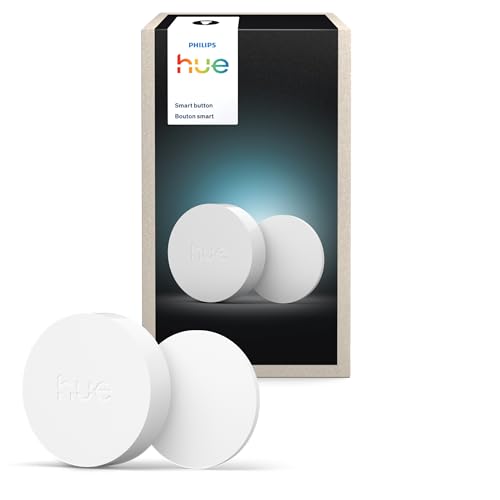
- Turns lights on/off and cycles scenes
- Press-and-hold dimming support
- Adhesive or magnetic mounting
Best For: Hue users wanting a dedicated wireless lighting controller
Top Pick for Home Assistant Scenes
SONOFF Fusion Zigbee Smart Scene Button SNZB-01M

- Up to 16 customizable scene triggers
- Zigbee Binding for direct device control
- TouchLink lighting control and dimming
Best For: Home Assistant and Zigbee users who want flexible scene control
Budget-Friendly Zigbee Remote
Wireless Zigbee Smart Button, 4-Way Remote Control

- 4 buttons with multiple press actions
- Works with Home Assistant, Homey, and Hubitat
- Requires a Tuya Zigbee hub
Best For: Compact Zigbee scene control on a budget
Long-Life 12-Scene Controller
Wireless Zigbee Smart Button, 12 Scene Controller

- Up to 12 scenes across 4 buttons
- Three press types: single, double, long
- Runs on 2 AAA batteries for up to 2 years
Best For: Users who want more scene options and long battery life
Multi-Action Zigbee Pick – Aqara Wireless Mini Switch
If you want a smart button for home automation that can handle more than one job, the Aqara Wireless Mini Switch is built for flexible one-touch control. It supports single press, double press, and long press actions, so you can trigger devices, scenes, an emergency alert, or even use it as a doorbell through a compatible Aqara Hub.
Best For: Aqara users who want a compact Zigbee button for scenes, alerts, and doorbell-style control.
Pros:
- Three control actions: single press, double press, and long press
- Works with Apple HomeKit, Google Home, Alexa, and IFTTT through Aqara Hub
- Can be used as an emergency button or doorbell with the hub
- Compact wireless design with included battery and simple mounting
Cons:
- Requires an Aqara Hub, sold separately
- Does not support hubs from other brands
- Needs proper 2.4 GHz or hub-specific Wi-Fi setup for the hub
For Aqara-centered smart homes, this is a practical low-profile button that adds useful control without wiring. Its value is strongest if you already use Aqara hardware and want a reliable shortcut for everyday automations.
Privacy-First Scene Controller – Onvis 5-Key Smart Button
The Onvis Smart Button is a strong smart button for home automation if you want lots of scene control in a small, wireless package. With five individual keys and support for single, double, and long press actions, it can handle up to 15 scenes while staying local to your Apple HomeKit setup.
Best For: Apple HomeKit users who want a privacy-focused multi-key scene controller.
Pros:
- Five keys with single, double, and long press support
- Thread and Bluetooth connectivity options
- No cloud or tracking; end-to-end encrypted with iOS devices
- Includes tape and magnetic mounting accessories
Cons:
- Requires a Thread-enabled Apple Home hub set as the connected hub
- iOS 17.4 or later is required
- Built for Apple HomeKit rather than broader platform support
This is a smart pick if your priority is local control, privacy, and lots of programmable actions from one button. It is especially appealing for HomeKit households that want a tidy wall-mounted or portable scene controller.
Zigbee Home Shortcut Button – THIRDREALITY Smart Button
The THIRDREALITY ZigBee Smart Button is a straightforward smart button for home automation when you want a simple remote for lights, fans, and scenes. It uses three control types—pressed, double pressed, and held—so one compact button can manage common routines through a compatible Zigbee hub.
Best For: Zigbee users who want an easy scene and device controller with long battery life.
Pros:
- Three actions: press, double press, and held
- Works with SmartThings, Aeotec, Hubitat, Home Assistant, and Third Reality Hub
- Compact design with tape and magnetic mounting included
- Runs on two AAA batteries and is rated for long battery life
Cons:
- Requires a Zigbee hub sold separately
- Apple HomeKit support needs the separately sold Smart Bridge MZ1
- Only one physical button, so it is less flexible than multi-key models
For users already invested in Zigbee, this button offers dependable basic control without much setup complexity. It is a practical choice if you want a simple wall-friendly remote for recurring automations and scenes.
Alexa Remote Automation Pick – Amazon Basics Smart Dimmer Remote
If your smart home runs on Alexa, this smart button for home automation acts like a portable remote for routines, devices, and everyday controls. The Amazon Basics Smart Dimmer Switch and Remote is battery-powered, easy to set up, and designed to work with Echo devices as your smart hub.
Best For: Alexa users who want a portable remote for lights, routines, and multi-device control.
Pros:
- Works with Alexa only, using compatible Echo devices
- Supports smart lights, blinds, locks, fans, thermostats, and more
- Portable and battery-powered for use anywhere in the house
- Simple guided setup in the Alexa app
Cons:
- Alexa-only compatibility limits flexibility
- Requires compatible Echo devices
- More of a smart remote than a multi-button scene controller
This is a convenient pick if you want fast Alexa control without reaching for your phone or voice assistant. It fits best in homes that already rely on Echo devices and want an easy handheld shortcut for daily routines.
Flexible Zigbee scene button – THIRDREALITY 2-Pack Smart Button
If you want a smart button for home automation that can trigger more than one action, this THIRDREALITY ZigBee button is built for simple scene control. It supports single press, double press, and hold actions, so you can map everyday routines like lighting, fans, blinds, or shutdown scenes to one compact remote.
Best For: Homes already using a Zigbee hub that want an easy multi-action button for routines and room control.
Pros:
- Three control options: pressed, double pressed, and held
- Works with SmartThings, Aeotec, Hubitat, Third Reality Smart Hub, and Home Assistant
- Includes wall tape and magnetic strips for flexible placement
- Battery-powered design with claimed long battery life
Cons:
- Requires a Zigbee hub, sold separately
- Limited to one supported device group per button setup
- Uses AAA batteries
For buyers who want a practical, low-power Zigbee controller, this model focuses on dependable shortcut-style automation rather than app-heavy controls. The included mounting accessories and simple multi-press logic make it a straightforward fit for recurring home scenes.
Routine and alert trigger – SONOFF SNZB-01P Wireless Push Button
This smart button for home automation is designed as a compact Zigbee trigger for scenes, routines, and alerts. The SONOFF SNZB-01P supports single press, double press, and long press actions, and it can also trigger Alexa routines when paired with a compatible SONOFF Zigbee hub.
Best For: Users who want a small Zigbee button for custom scenes, Alexa routines, or an emergency alert function.
Pros:
- Customizable single, double, and long press actions
- Supports Zigbee 3.0 hubs and SONOFF ecosystem devices
- Can trigger Alexa routines with a SONOFF Zigbee hub
- Includes an emergency button use case for alerts
Cons:
- Requires a Zigbee hub
- Battery life claim is based on internal laboratory data
- Best fit is within Zigbee-based setups, not standalone use
For a budget-friendly wireless trigger, this SONOFF button keeps the interface simple while offering the main automations most people need. It is especially appealing if you already use eWeLink or want a small button that can double as a family alert device.
Hue-focused lighting switch – Philips Hue Wireless Smart Light Switch Button
If your priority is lighting, this smart button for home automation is tailored to the Philips Hue ecosystem. The Hue Wireless Smart Light Switch Button lets you turn lights on and off, cycle scenes, dim or brighten with a press and hold, and start or stop automations from the Hue app.
Best For: Philips Hue owners who want a wireless, no-wire light control button for scenes and automations.
Pros:
- Controls lights, scenes, dimming, and automations
- Time-based light function comes enabled by default
- Flexible mounting with adhesive or magnetic placement
- Works with the Philips Hue Bridge and Hue lights
Cons:
- Requires a Hue Bridge
- Primarily focused on lighting control
- Best value depends on already using the Hue ecosystem
This is the most specialized option in the group, and that is a strength if your home automation setup centers on Hue lighting. It is less of a general-purpose button, but for lights and scene changes it offers a clean, familiar experience.
Top Pick for Home Assistant Scenes – SONOFF Fusion Zigbee Smart Scene Button SNZB-01M
If you want a smart button for home automation that can trigger lots of routines from a single compact controller, this SONOFF Zigbee scene button is built for that job. It supports up to 16 customizable actions through four buttons with single, double, triple, and long-press inputs, and it works with Home Assistant, SmartThings, Zigbee2MQTT, and SONOFF’s own ecosystem—though a Zigbee hub is required.
Best For: Home Assistant users and Zigbee setups that need flexible local scene control.
Pros:
- Four buttons with up to 16 programmable scene triggers
- Zigbee Binding for direct control of Zigbee devices or groups in Home Assistant
- TouchLink support for instant light control and dimming
- Wireless install options include handheld use, magnetic placement, wall mounting, or adhesive setup
Cons:
- Zigbee hub required for use
- Best features depend on supported Zigbee platforms and devices
Overall, this is the strongest option here if you want a highly configurable smart button with local-style control and broad Zigbee compatibility. The combination of 16 actions, Binding, and TouchLink makes it especially practical for lighting and scene control.
Budget-Friendly Zigbee Remote – Wireless Zigbee Smart Button, 4-Way Remote Control
This smart button for home automation is a straightforward 4-button Zigbee remote for triggering scenes and device actions without opening an app. Each button supports single press, double press, and long press actions, and it works with platforms like Home Assistant, Homey, and Hubitat, but it does require a Tuya Zigbee hub.
Best For: Users who want a compact scene controller for Zigbee-based automations.
Pros:
- 4 buttons with single, double, and long-press actions
- Compatible with Home Assistant, Homey, and Hubitat
- Can trigger device actions, blinds, and pre-programmed scenes
- Includes a lithium button battery for cordless use
Cons:
- Requires a Tuya Zigbee hub
- Compatibility depends on the platform and gateway used
For a simple Zigbee remote that covers the basics well, this model offers useful flexibility without extra complexity. It’s a practical choice if you mainly need fast scene triggering and broad platform support through the right hub.
Long-Life 12-Scene Controller – Wireless Zigbee Smart Button, 12 Scene Controller
If you need a smart button for home automation with a bit more scene capacity, this 4-key Zigbee controller is designed to handle up to 12 scenes through three pairing modes per button. It supports single-click, double-click, and long-press actions, and it works with Tuya Zigbee Hub, Zigbee 3.0 USB Dongle, and Home Assistant.
Best For: Users who want a simple multi-scene controller with long battery life.
Pros:
- Up to 12 scenes from four buttons and three pairing modes
- Supports single-click, double-click, and long-press actions
- Compatible with Tuya Zigbee Hub, Zigbee 3.0 USB Dongle, and Home Assistant
- Powered by 2 AAA batteries for up to 2 years of use
Cons:
- Requires a Zigbee hub or dongle setup
- More limited in trigger capacity than the SONOFF model
This is a solid pick if you want more scene options than a basic remote and value long battery life. It’s best suited to users who want dependable Zigbee control for lights, curtains, switches, and routines.
How We Picked the Best Smart Button for Home Automation
We focused on compatibility, scene flexibility, setup simplicity, ecosystem support, and value. For a Smart Button for Home Automation, the best choice is usually the one that works reliably with your existing hub or platform and gives you the actions you’ll use every day.
We also looked for devices that offer practical control options such as single press, double press, long press, or multi-action scenes, since those features make a small button much more useful.
Quick Comparison: What to Match to Your Home
If you use Apple Home, look closely at HomeKit-friendly options. If your home is built around Zigbee, choose a model that works with your hub or controller. Alexa-centric homes may benefit from devices that are designed specifically for Echo and Alexa routines.
Consider whether you want a portable remote-style button, a wall-mounted controller, or a compact scene trigger you can place anywhere. The best Smart Button for Home Automation is the one that fits where and how you actually live.
Key Buying Factors for a Smart Button for Home Automation
Platform Compatibility
Confirm whether the button needs a separate hub, such as Zigbee, Thread, or a proprietary bridge. A compatible hub is often the difference between a smooth setup and a frustrating one.
Action Types
More press options mean more flexibility. A basic single-action button can be great for one routine, while multi-scene controllers let you control several devices from the same spot.
Placement and Power
Portable battery-powered buttons are ideal for desks, couches, and bedside tables. If you want something more permanent, consider wall-friendly designs or devices that feel natural in high-traffic areas.
Automation Depth
Some buttons only trigger scenes, while others support direct device control, dimming, or advanced bindings. Choose based on whether you want simple shortcuts or more granular control.
Who Should Buy Which Smart Button for Home Automation?
Choose a simple scene button if you mainly want one-tap control for lights or routines. Pick a multi-key controller if you want several commands in one compact device. If you are already invested in a specific platform like HomeKit, Alexa, Hue, or Zigbee-based ecosystems, it usually makes sense to stay within that ecosystem for the easiest setup and most reliable automations.
For most homes, the best Smart Button for Home Automation is the one that reduces daily friction the most. Start with the routine you use constantly, then match the button’s compatibility and control style to that task.