A surround sound decoder can bring multichannel audio to an analog speaker setup, but only if its inputs, supported formats, and outputs match your equipment.
These eight options cover optical and coaxial audio, HDMI extraction, and LPCM conversion. The right choice depends less on the longest feature list than on the signal your source actually sends.
Best 8 Surround Sound Decoder Picks for 2026
Best for LPCM Conversion
HDMI LPCM 7.1/5.1 Analog Decoder
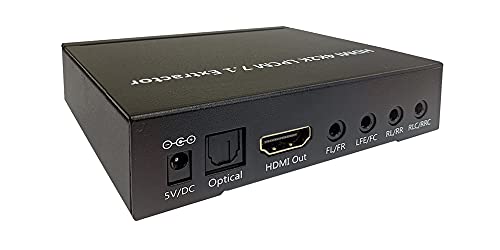
- Converts HDMI LPCM 7.1/5.1 to analog
- Optical output passes compressed bitstreams
- EDID switches select source audio format
Best For: HDMI LPCM sources and existing analog surround receivers
Best for Multiple Sources
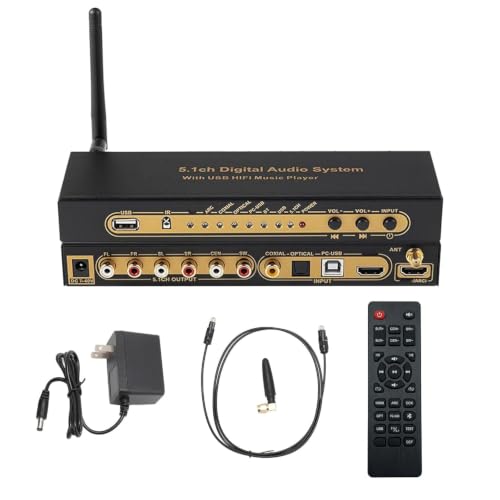
- HDMI, optical, coaxial, and USB inputs
- Listed 4K/60 Hz HDR passthrough
- Remote control and virtual 5.1 for stereo
Best For: Multi-source setups with 5.1-input amplifiers or active speakers
Best for Optical or Coaxial Sources
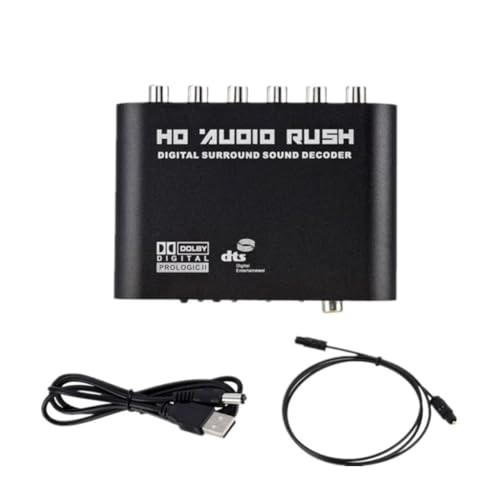
- Described as a DTS/AC3 5.1 decoder
- Lists optical, coaxial, and USB interfaces
- Output connectors need verification
Best For: Optical or coaxial DTS/AC3 source setups
Best for Flexible Outputs

- Listed HDMI 2.0b 4K/60 Hz passthrough
- Analog 5.1 and digital output options
- DTS/AC3 decoding with remote control
Best For: 4K sources needing analog 5.1 and digital outputs
Simple Digital-to-Analog Pick

- Optical and coaxial inputs
- Six discrete analog outputs
- USB and optical cables included
Best For: Digital sources paired with powered 5.1 speakers
DVD and Video Source Pick

- Stereo and 5.1 output modes
- Listed for DVD players and PCs
- Confirm ports and cable contents
Best For: DVD- or HD-video-based home-cinema setups
Multi-Source HDMI Pick

- Three HDMI inputs with 4K/60 output
- ARC, Bluetooth, optical, and coaxial
- Adjustable channels; two remotes
Best For: Multi-device setups needing HDMI switching and 5.1 analog output
Compact Placement Pick

- Optical and coaxial connections
- DTS-to-5.1 analog positioning
- Verify outputs and accessories
Best For: Compact setups with optical or coaxial sources
Best for LPCM Conversion – HDMI LPCM 7.1/5.1 Analog Decoder
This surround sound decoder converts uncompressed LPCM 5.1 or 7.1 audio from HDMI into multichannel analog output, making it a practical match for an existing analog amplifier or receiver.
Best For: HDMI sources sending multichannel LPCM to an analog surround system.
Pros:
- Outputs LPCM 7.1, 5.1, or stereo through multichannel 3.5 mm ports.
- Passes embedded Dolby Digital, AC3, and DTS bitstreams through optical output for a downstream decoder.
- EDID dip switches help select the audio format requested from the HDMI source.
Cons:
- Compressed Dolby Digital and DTS require a separate downstream decoder for playback; this unit sends them through optical output.
- HDMI compatibility is specified as HDMI 1.3 and HDCP 1.2, so check requirements for newer protected sources.
Choose this model for HDMI-to-analog LPCM conversion rather than onboard decoding of compressed surround formats. Its repeater function and listed 4Kx2K passthrough add flexibility where the HDMI signal also needs to continue to a display.
Best for Multiple Sources – 5.1CH Digital Sound Decoder
This surround sound decoder brings HDMI, optical, coaxial, and USB sources into a 5.1 setup, with support for Dolby Digital, DTS, and several music-file formats. Its specified HDMI 2.0b passthrough supports 4K at 60 Hz and HDR.
Best For: A home theater using several digital sources with a power amplifier or active speakers that have 5.1 input.
Pros:
- Accepts HDMI, optical, coaxial, and USB inputs.
- Lists Dolby Digital/AC3, DTS, DTS-ES, FLAC, APE, AAC, and MP3 support.
- Includes an IR remote and supports 24-bit/192 kHz audio sampling.
Cons:
- Its virtual 5.1 processing for stereo sources is not the same as a discrete 5.1 soundtrack.
- Check that your amplifier or active speakers have a compatible 5.1 input.
This is a flexible pick when source switching and current-generation video passthrough matter. Confirm your intended output connections before buying, as the supplied details emphasize compatibility with equipment that accepts 5.1 input.
Best for Optical or Coaxial Sources – DTS/AC3 5.1 Audio Decoder
This surround sound decoder is a straightforward option for decoding DTS or AC3 5.1 audio from compatible playback devices. The listing identifies optical, coaxial, and USB interfaces and describes stereo and 5.1-channel output modes.
Best For: A setup centered on optical or coaxial audio from a PC, set-top box, or Blu-ray player.
Pros:
- Specifically described as a DTS/AC3 5.1-channel decoder.
- Lists optical, coaxial, and USB interfaces.
- Names PCs, HD set-top boxes, and Blu-ray DVD players among compatible sources.
Cons:
- The supplied notes do not specify supported HDMI connections or video passthrough.
- Output connector types and detailed format limits are not clearly documented in the supplied notes.
Consider this model if DTS/AC3 decoding is the priority and you can verify its connectors against your source and speaker equipment. Buyers needing clearly specified HDMI features should look elsewhere in this list.
Best for Flexible Outputs – 5.1CH Digital Audio Extractor
This surround sound decoder combines listed 4K/60 Hz HDMI 2.0b passthrough with decoding from HDMI, optical, coaxial, and USB sources. Its stated analog 5.1-channel and digital optical/coaxial outputs give you several ways to connect downstream audio equipment.
Best For: A 4K gaming or streaming setup that needs both analog 5.1 and digital audio output options.
Pros:
- Lists HDMI 2.0b, 18 Gbps bandwidth, 4K/60 Hz passthrough, and HDCP 2.3/2.2/1.4 support.
- Supports DTS, DTS-ES, AC3, FLAC, and APE, with 24-bit/192 kHz sampling specified.
- Offers stated analog 5.1 and optical/coaxial outputs, plus an included remote.
Cons:
- Its virtual 5.1 mode for stereo material does not create a discrete surround soundtrack.
- Some port descriptions in the supplied listing are incomplete, so verify the exact connections you need.
This is the more connection-focused choice if you want to route decoded audio into an older 5.1 system while passing 4K video through. Check the physical ports before ordering, especially if a particular analog connector type is essential.
Simple Digital-to-Analog Pick – 5.1 DTS/AC-3 Decoder
This surround sound decoder converts optical or coaxial digital audio into six discrete analog outputs. It is a straightforward option when you already have powered 5.1 speakers and need a way to connect a digital source.
Best For: Connecting a TV, disc player, or game console to powered 5.1 speakers.
Pros:
- Decodes DTS and AC-3 to 5.1-channel analog audio.
- Provides separate front, center, surround, and subwoofer outputs.
- Includes USB and optical cables; offers stereo/5.1 switching.
Cons:
- Only optical and coaxial digital inputs are specified; no HDMI input is listed.
- Needs powered speakers or an appropriate amplifier for playback.
If your source has optical or coaxial output, this keeps the conversion setup simple. Check your speaker connections before buying.
This surround sound decoder is positioned for HD video players, DVD players, and other digital audio sources. It supports stereo and 5.1-channel output, with labeled controls intended to make everyday operation easier.
Best For: A home-cinema setup built around a DVD player or HD video source.
Pros:
- Supports stereo and 5.1-channel output modes.
- Lists compatibility with DVD players, PCs, and HD set-top boxes.
- Product title lists a USB cable and fiber-optic cable with the host unit.
Cons:
- The supplied details do not clearly specify every input and output connector.
- The title lists cables, but the included-components field says “No”; verify the package contents.
Consider this for a DVD-focused system, but confirm its ports and included accessories match your equipment before ordering.
This surround sound decoder combines three HDMI inputs and one HDMI output with 5.1 analog audio output. It is the most connection-heavy option here, adding ARC, optical, coaxial, USB, auxiliary, and Bluetooth 5.0 sources.
Best For: Switching among several video and audio sources while feeding an amplifier or active 5.1 speakers.
Pros:
- Supports 4K at 60Hz, HDR, HDMI ARC, and HDCP 2.2.
- Accepts HDMI, optical, coaxial, USB, auxiliary, and Bluetooth sources.
- Offers per-channel volume adjustment and includes two remotes.
- Distinguishes hardware-decoded 5.1 sources from virtual 5.1 output derived from stereo.
Cons:
- Audio volume from the decoder cannot be controlled with the TV remote.
- Digital output is not supported during USB-drive playback.
Choose it if source switching and HDMI video passthrough matter as much as surround decoding. For ARC, the seller specifies an HDMI 2.0 cable with a 19+1-core configuration.
This surround sound decoder is described as converting digital audio to 5.1 analog output for a compact home-entertainment setup. The listing names optical, coaxial, and analog connections and highlights DTS decoding.
Best For: A space-conscious setup with a player that provides optical or coaxial audio.
Pros:
- Optical and coaxial connectivity is listed.
- Designed to decode DTS sources to 5.1 analog audio.
- Listed package weight is 10.2 ounces.
Cons:
- The supplied details do not specify the exact output connectors or supported formats beyond DTS.
- Accessories and included cables are not identified.
Its compact positioning may appeal if space is tight, but verify the connector layout against your source and speaker system before purchasing.
How We Picked These Surround Sound Decoders
We focused on the connection paths buyers are most likely to need: optical or coaxial digital audio to analog 5.1, HDMI audio extraction, and HDMI LPCM conversion. We also considered stated support for formats such as DTS and AC-3, plus HDMI features where relevant. Product names alone cannot confirm real-world compatibility, so check the current listing and manual before ordering.
Quick Comparison: Start with Your Source
If your TV or player has an optical or coaxial output, start with a decoder that accepts that connection and explicitly supports the audio format you plan to send. For an HDMI-only source, look at an HDMI extractor or LPCM decoder instead. An HDMI model with several inputs may also help consolidate devices, but verify its video passthrough specifications against your display and sources. HDMI switching, audio extraction, and surround decoding are different functions; do not assume every unit does all three.
Key Buying Factors for a Surround Sound Decoder
Audio Format and Channel Support
Check whether your source outputs stereo PCM, multichannel LPCM, Dolby Digital/AC-3, or DTS. A device labeled “5.1” may decode compressed 5.1 formats but not accept multichannel LPCM; another may target LPCM while handling other formats differently. If your TV can output only stereo PCM through its selected connection, a decoder cannot recover discrete 5.1 channels from that signal. Also confirm whether any advertised 7.1 support applies to the input, output, or both.
Connections and Speaker Compatibility
Match the input to the source and the outputs to your amplifier or powered speakers. Many decoders provide line-level analog channels rather than speaker-level power, so passive speakers still need amplification. Check connector types, channel labels, and whether a subwoofer output is provided. Verify the included power supply and any required cables rather than assuming they are in the box.
HDMI and Video Passthrough
For an inline HDMI device, confirm the stated resolution, refresh rate, HDR support, and HDCP compatibility for your entire signal chain. A 4K label by itself does not establish that every 4K mode your source uses will pass through. If you do not need HDMI video switching, a simpler optical or coaxial model may be easier to integrate.
Who Should Buy Which Surround Sound Decoder?
Choose an optical/coaxial 5.1 decoder for a compatible digital-audio output feeding an analog amplifier or powered speaker system. Choose an HDMI audio extractor when the source sends audio over HDMI and you also need to route video onward. Choose an HDMI LPCM-focused model if your source is set to output multichannel LPCM; verify its accepted channel count and analog outputs first. If you already have an AV receiver that decodes your source formats and powers your speakers, a separate decoder is unlikely to add much.